
Get in touch with LFADJ Company

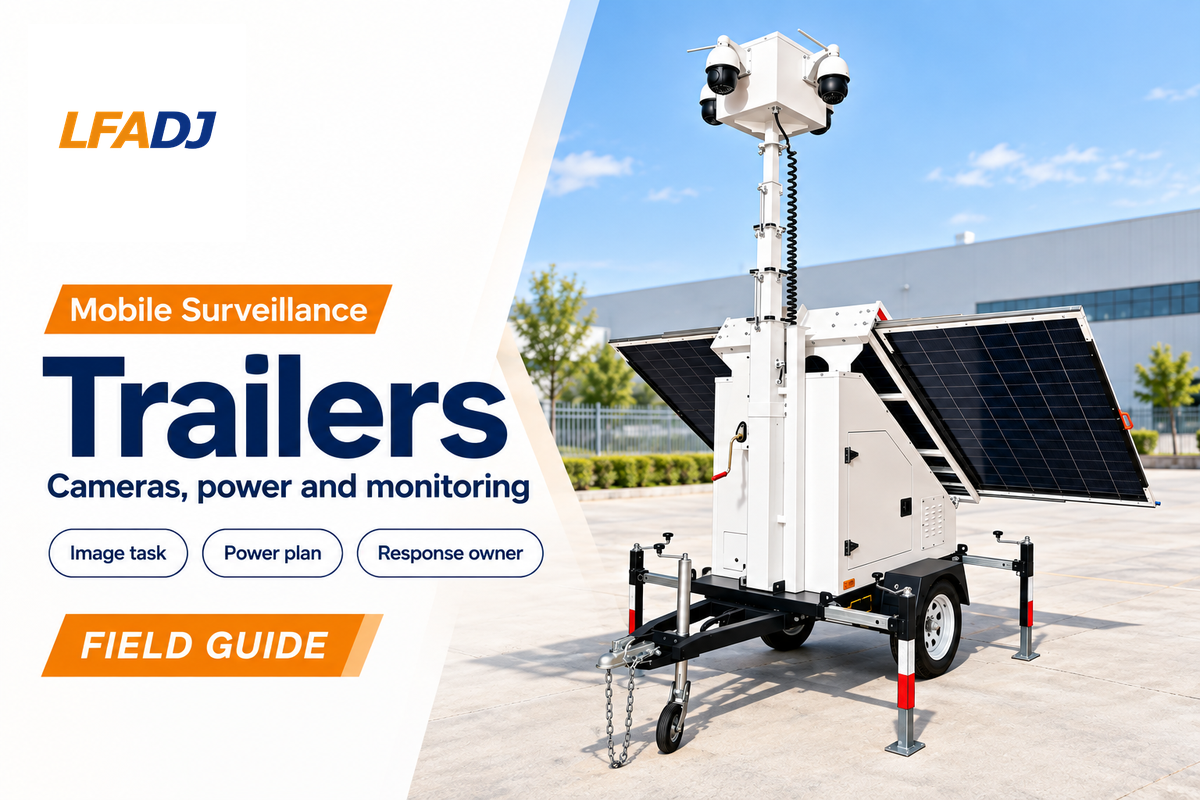
Mobile surveillance trailers are towable camera stations with onboard power, recording and a communications link. They’re suited to jobs where a camera is moved with the work and good coverage is required to show what’s happening. Raised viewpoints require an observer to take action on what they see.
Mobile surveillance trailers provide a relocatable viewpoint without building a permanent camera network. There must be a decision about what’s worthy of being seen, a way to retain and distribute videos of evidence, and a person responsible for taking action on alerts. This guide addresses these issues for construction, security, and purchasing managers.
Quick Specs: what defines the system
- Platform: towable base, stabilizers and an elevated camera mast.
- Imaging: For a mobile surveillance trailer, a task determines the type of fixed, panoramic, or PTZ camera.
- Power: batteries with solar charging, mains or generator support as configured.
- Operations: recording, communications and separately defined monitoring responsibilities.
- Choose the image task before choosing camera count.
- Check power, local recording and remote connectivity separately.
- Compare equipment and monitored services on equal scope.
- Give every alert and maintenance task a named owner.
How Mobile Surveillance Trailers Work
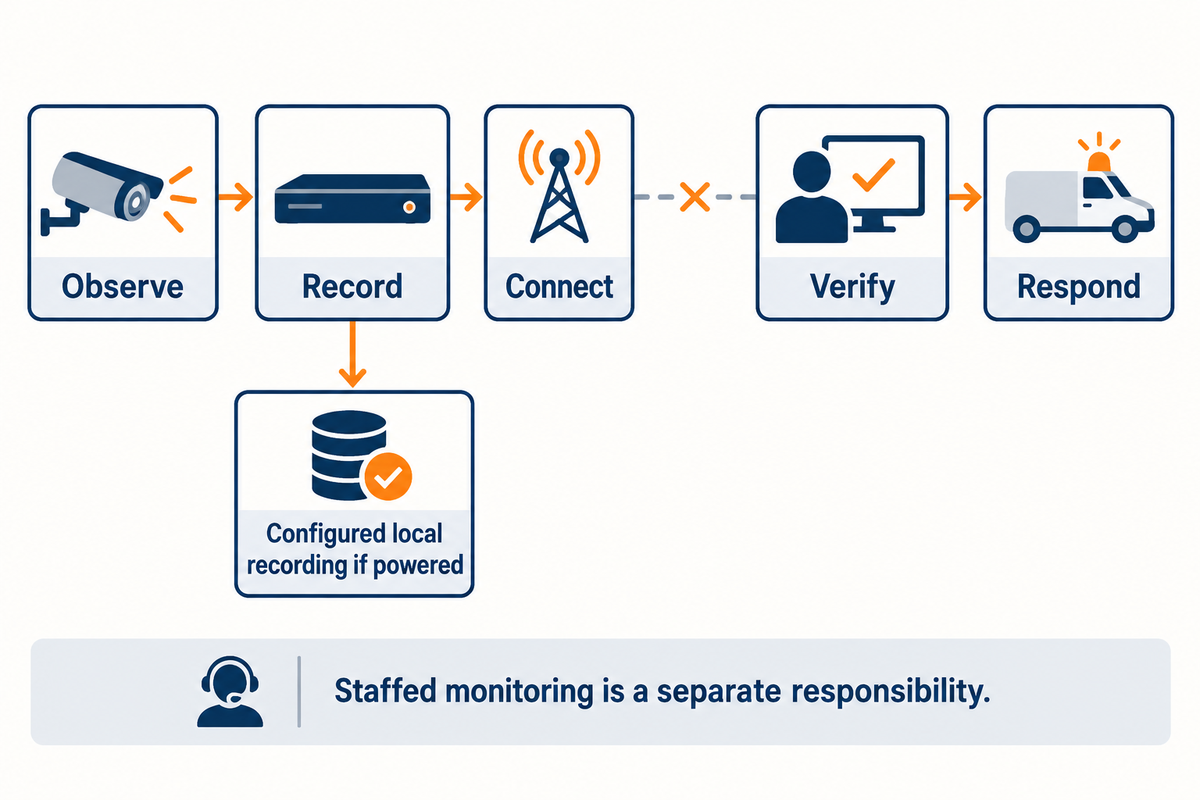
A mobile surveillance trailer integrates the main components of a video surveillance system on a relocatable base. The system includes cameras, a recording unit, and a communication link. A power system, batteries and a charger, completes the electronics. A monitoring system determines what action is taken for an observed condition.
The trailer platform brings those parts together, but their functions remain distinct. A solar charger, for example, doesn’t create an internet connection. A modem doesn’t determine if a person at a fence is authorized. A loudspeaker, in a deterrence system, can play a prerecorded message, but a person or agreed rule must initiate the action.
A typical security camera trailer has a lockable equipment compartment, a lifting mast, camera mounts, a recorder or edge storage, and a router. Some mobile surveillance camera trailers have lighting, speakers, motion detection and AI analytics. Specify the installed camera, recorder and software together so that advertised surveillance capabilities are actually available in the delivered configuration.
5-Link Observation-to-Response Chain
The 5-Link Observation-to-Response Chain checks whether a site is able to observe, record, connect, verify and respond to an incident.
The chain can be used as a practical design method. Identify the person, vehicle or action that’s important and record the image. Show how the verified event is connected to the viewer and how that triggers a response. A break can leave useful functions working, so “offline” is too vague for fault reporting.
As an example, a camera trailer can lose its cellular connection and still record locally. The security team has lost immediate remote visibility, but not necessarily the recording. The outage map below separates these states so maintenance staff and monitoring operators receive a useful description of the problem.
In SDM’s January 2026 reporting on security trailers some service providers described different equipment and service combinations. That distinction matters when assessing a surveillance solution: a delivered trailer and a staffed monitoring service carry different responsibilities.
Where a Trailer Fits Compared with Fixed Cameras and Guards
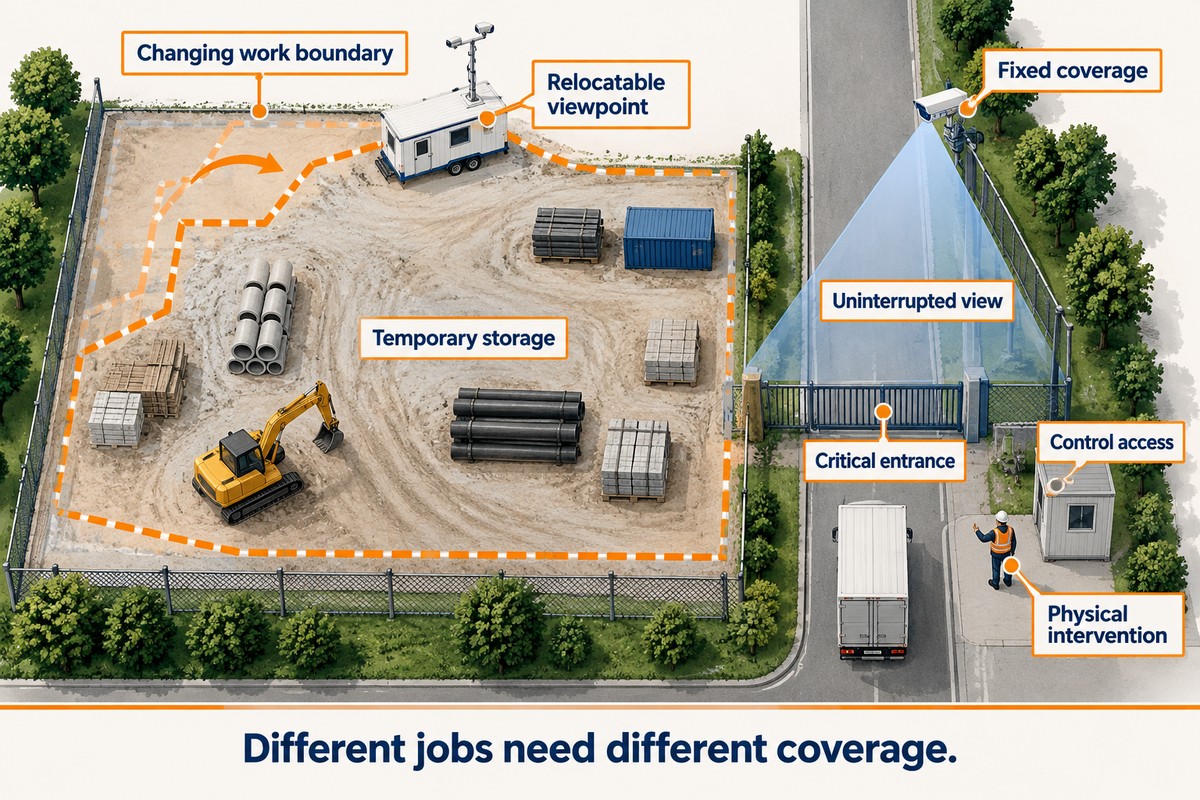
Temporary surveillance favors a trailer for construction site surveillance when the work area changes and permanent infrastructure would be difficult to justify. Fixed security cameras are good for stable entrances and viewing positions. Security personnel add physical intervention, access control and judgment on the ground; a camera platform helps them see more but cannot perform those physical tasks.
For constant surveillance of a gate, keep a dedicated view aimed there. Traditional security work still includes people controlling access and intervening on site.
For this use case, the initial site boundary may change with earthworks and material deliveries, and an already obstructed line of sight may be further obscured by new construction. Parking lots, storage yards and short-term projects present different constraints: moving vehicles can obstruct a camera, and a distant boundary may need its own viewpoint.
Consider a hypothetical contractor working through two phases of a job site. During the first phase, the focus may be on an open equipment yard and an access control gate. During the second phase, an obstructed line of sight may be blocked by materials and new construction. A mobile trailer allows the team to position the camera for a clear view of access to the yard and the construction site. Staff control the flow of vehicles and may adjust a camera’s field of view to conduct surveillance of site access. The trailer doesn’t replace every existing security measure just because it has several cameras.
Choose a relocatable viewpoint
- Follow a changing work boundary.
- Cover temporary storage or an event perimeter.
- Don’t put in a permanent camera pole for a short project.
Keep fixed coverage or staff
- Retain an uninterrupted view of a critical entrance.
- Control access and resolve uncertain situations in person.
- Maintain permanent coverage after the project finishes.
The National Institute of Justice’s CCTV evidence profile, summarizing a 2019 review, distinguishes active monitoring from passive recording. Outcomes were variable. The historical review concerns general CCTV, so its findings shouldn’t serve as a promised crime-reduction percentage for security trailers.
Camera Options, Field of View and Useful Evidence
Effective camera coverage depends on the task. The tasks range from capturing and monitoring movements and following vehicles to recognizing known persons and/or subjects. Where coverage is general, pixels are spread thin and don’t capture fine detail. Some tradeoffs between detail and coverage must be made, but placing the camera at the correct position with the right lens can capture detail.
A surveillance camera needs a clear view of the target. Fixed cameras hold a consistent view. PTZs are good for following activity because of their zoom and/or pan function. However, a zoomed PTZ can’t watch other directions at the same time. Panoramic cameras offer wider context, while a separate narrow view can preserve detail at a gate or loading point.
The IEC 62676-4:2025 application guidelines published on October 9, 2025 cover planning, design, installation, testing, commissioning and maintenance. In the project brief, state the viewing task and the standard edition. A megapixel label alone does not describe the image a human operator will receive under poor light or heavy compression.
How will we be sure the cameras are placed in the right location?
Check the actual target points using recorded daytime and nighttime clips, not only a live overview. Place a person or vehicle at the entrance, boundary and obstruction points. Review exported footage at normal playback size and confirm that the required detail remains visible when the PTZ is looking elsewhere.
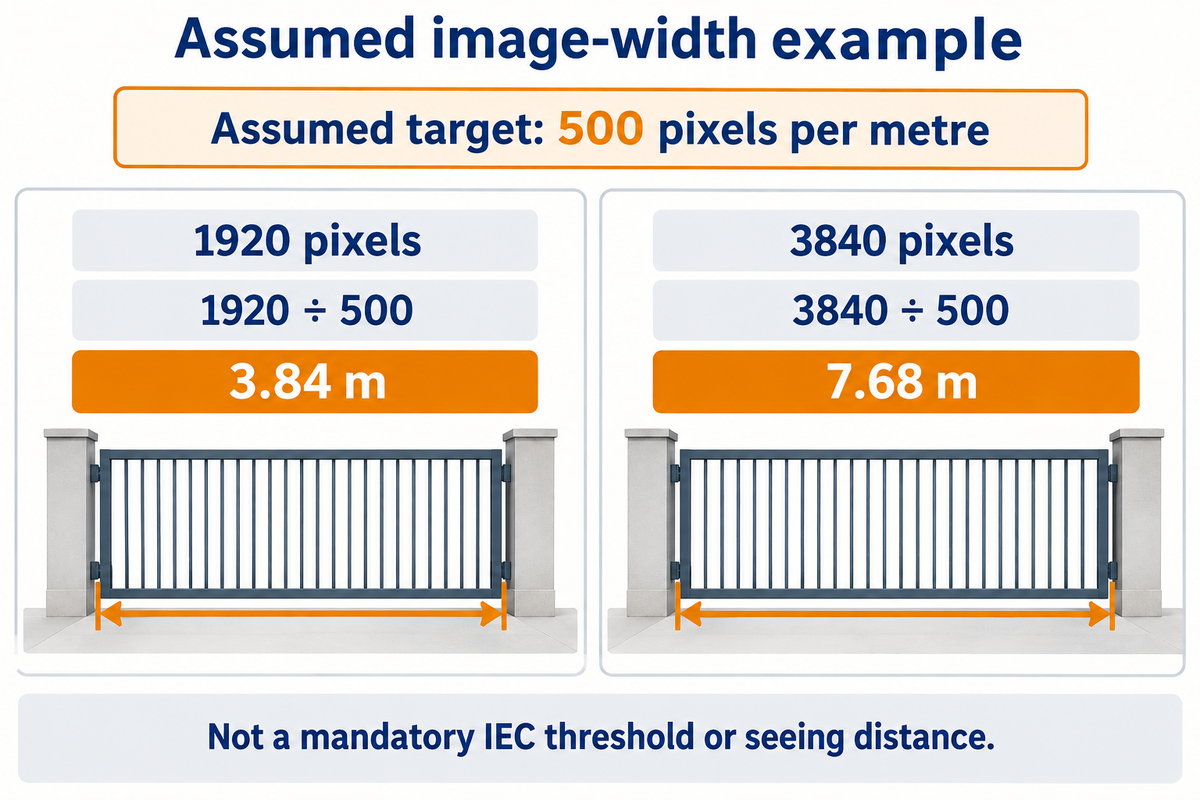
As a first geometric estimate, divide the number of pixels in the horizontal image by the required pixel-density of the target. The target must be aligned to the project task and isn’t a universal guarantee for recognition or identification.
| Assumed horizontal pixels | Calculation | Scene width at that target |
|---|---|---|
| 1920 pixels | 1920 ÷ 500 | 3.84 m |
| 3840 pixels | 3840 ÷ 500 | 7.68 m |
Let’s say a hypothetical site brief sets a 500 pixels-per-metre target across a gate. Assuming a 1920-pixel wide image, the initial scene-width allowance would be 1920/500, or 3.84 metres. An assumed 3840-pixel-wide image would give 7.68 metres at the same target. If the gate is wider than the first allowance, the designer can narrow the scene, add a dedicated view, or consider higher resolution. The result doesn’t say how far the camera can see. Lens geometry, angle, glare, movement and compression still affect the delivered image. The final check is if the recorded clip does its job at the gate, including at night.
An elevated security camera tower can still have blind spots behind obstructions. Human viewing, automatic plate reading, other AI functions and thermal imaging need their own acceptance criteria. Don’t assume that a successful human viewing example validates other forms of analytics.
Solar Power, Batteries and Backup
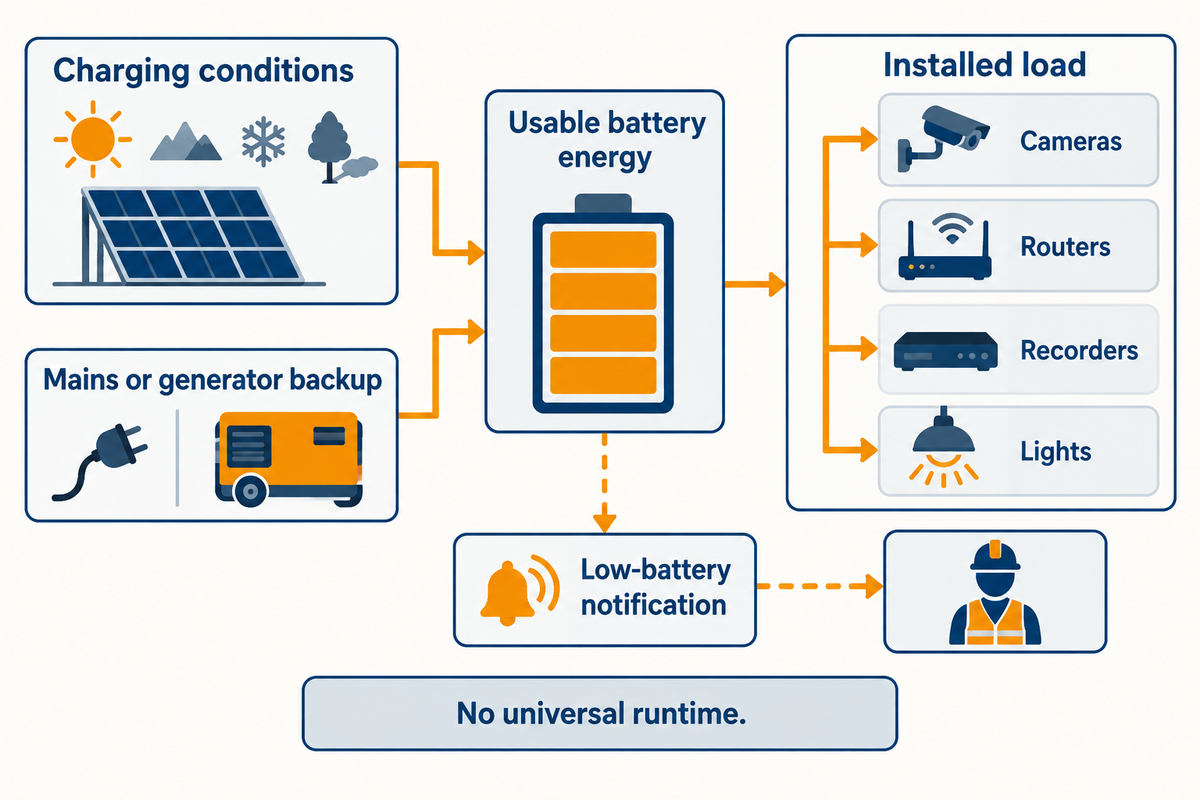
Solar-powered mobile surveillance trailers require enough charge and usable energy to cover the installed load and the site’s difficult operating period. Solar panels supply energy when conditions permit; batteries carry the load when charging is insufficient. Mains or generator backup can support continuity where winter weather, shading or added equipment creates a shortfall.
Separate the capacity to charge from energy demand. Camera heaters, infrared illumination, lights, routers, recorders and speakers can change consumption. A daytime estimate that excludes nighttime lighting or cold-weather heating can make a solar-powered system look more capable than the installed package.
The Energy Department’s PVWatts catalog describes an estimator for grid-connected photovoltaic production, and includes the location and system inputs. Solar-resource estimates help frame the charging question, but they do not establish the autonomy of a battery-powered trailer with a changing electrical load.
Matching solar power and battery systems to the site
Prior to towing the unit, determine the longest period with poor charging and list both continuous and intermittent loads. Use usable battery energy under the manufacturer’s operating limits, including temperature and permitted discharge. Compare that demand to charging for the project location and season. Keep back-up charging accessible to the crew that will be responsible for it.
A management officer wants to know which functions will remain powered first in a low-charge event. A bright auxiliary light can be useful, but losing the recorder or communications link to support lighting may defeat the security objective. Define the low-battery behavior and the notification route before the equipment is left unattended.
Use the surveillance trailer energy budget worksheet to calculate separate loads and storage. Keep assumptions with results, so adding a light or heater requires a new estimate.
Connectivity, Recording and Remote Access
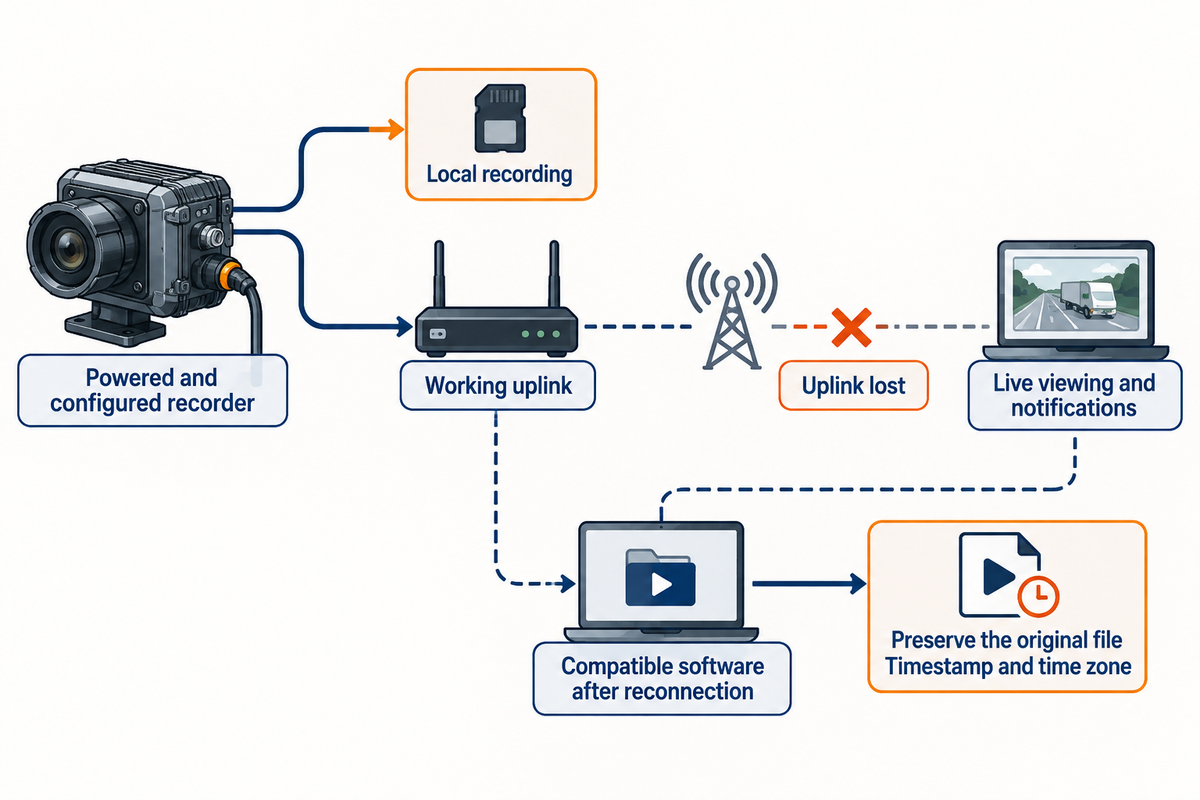
In lieu of a wired connection, a remote surveillance trailer may use cellular service, a site network or other configured uplink. Local recording and remote access are separate capabilities. A supported, powered recorder may continue to store data; a loss of the network may affect the viewer. The viewer may regain access to the data with compatible software after reconnection.
Can a mobile surveillance trailer work without Wi-Fi at a remote site?
Yes. Mobile surveillance units can use a cellular connection instead of site Wi-Fi when the router, service plan and coverage support the installation. Remote locations still need a usable uplink for live viewing and notifications. Local recording can work without that uplink, but only if the installed recorder is configured and powered to do so.
Real-time viewing needs a working uplink. Test connectivity where the trailer will stand and at the hours it will operate. A phone showing signal bars is no evidence that several camera streams will upload reliably. Match the data plan to the video quality you’ve chosen, your viewing habits, and the cloud transfer settings. Different settings will change the bandwidth required for the viewing request.
A cloud surveillance platform may support video monitoring across sites. Check what’s still available when the account, router or uplink is unavailable. Also check if compatible video camera management software can retrieve recordings upon reconnection. An ONVIF or RTSP requirement should be stated in the selection brief; battery operation alone doesn’t say anything about recorder compatibility.
Storage planning needs bitrate, recording schedule, camera count and retention period. The video storage planning calculator helps work through those inputs. Keep a separate requirement for preserving an incident before routine recording overwrites it.
NIST’s Digital Video Exchange Standards project explains how conversion of proprietary CCTV exports can degrade video quality, lose metadata and delay investigations. Check a native export on a separate computer, preserve the original file, and record the timestamp, time zone and any known clock offset. A playable clip and a clear account of when it was captured are different acceptance checks.
From an Alert to an Actual Response
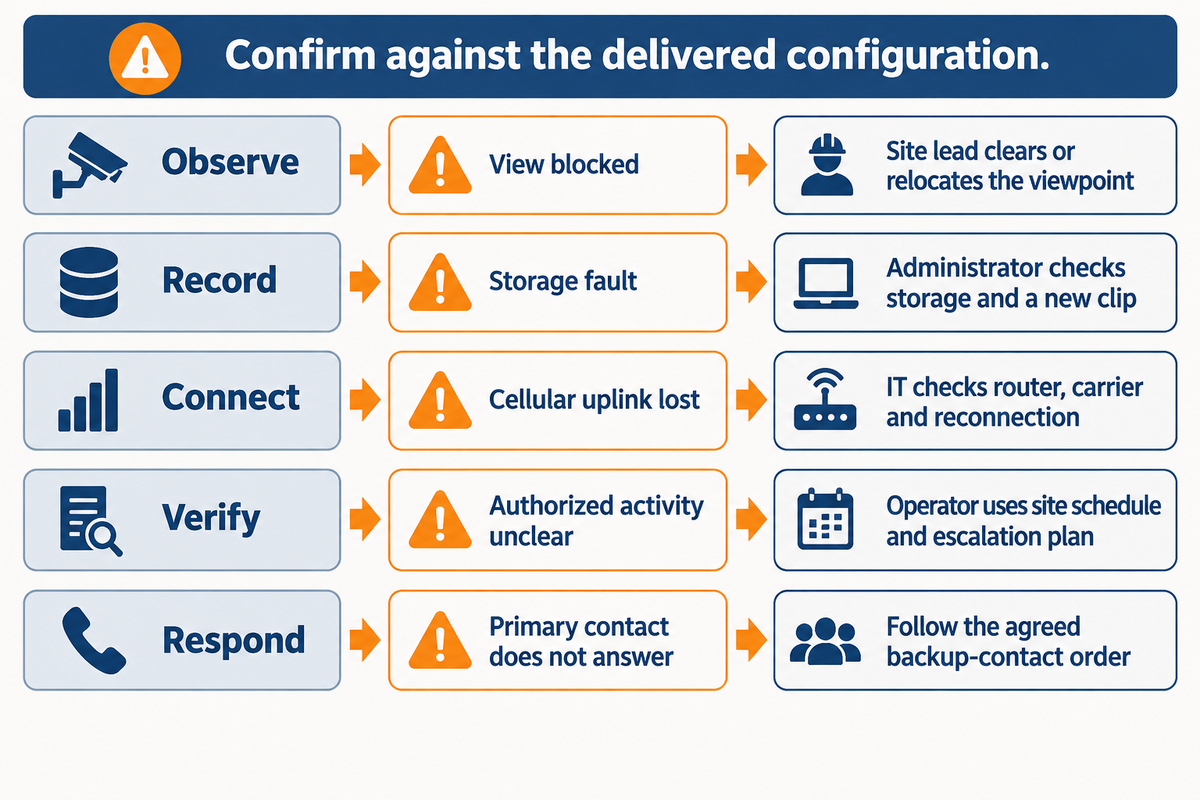
An alert becomes applicable when a person or process verifies the incident and initiates an appropriate action. Motion detection, AI classification, live viewing, speaker warning and a call to responders are different features. Remote monitoring capabilities should therefore be specified with operating hours, escalation contacts and an owner for unresolved incidents.
Andy Schreyer of Stone Security stated the integration problem clearly in SDM:
“The real challenge is power, communication and reliability.”
Use this map with the installer, IT contact and the monitoring team. The ‘still available’ column is for confirmation against the delivered configuration. It isn’t to say that all trailers have the listed fallback.
| Function category | Failure to identify | What may remain available | First action and owner |
|---|---|---|---|
| Observe | View blocked by a delivery or new structure | Other camera views | Site lead clears or relocates the viewpoint. |
| Observe | Night image lacks the required detail | An overview of movement | Installer checks lighting, exposure and lens setup. |
| Record | Storage fault or incorrect recording schedule | Live view while connected | System administrator checks storage health and a new clip. |
| Record | Incident overwritten before export | Later recordings | Evidence owner preserves relevant footage promptly. |
| Connect | Cellular uplink lost | Configured local recording if powered | IT or service provider checks router, carrier and reconnection. |
| Connect | Remote account inaccessible | On-device footage if recording | Account administrator restores authorized access. |
| Verify | Alarm cannot be distinguished from authorized activity | Recorded event for review | Monitoring operator uses the site schedule and escalation plan. |
| Respond | Primary contact does not answer | Verified event information | Operator follows the agreed backup-contact order. |
| Respond | Incident needs physical intervention | Video and location information | Authorized site personnel or emergency services handle intervention. |
The Monitoring Association’s AVS-01 explanation separates alarm information into classifications that help public safety agencies apply their own response policies. The distinction is useful for buyers: an AI surveillance trailer generating an alert has not, by that action alone, obtained a police dispatch or guaranteed responder arrival.
An effective security solution allocates responsibility for unresolved incidents. For effective surveillance, provide operators with the current gate locations, access and work schedules. Test a permitted event from detection through notification, and document where responsibility changes from the service provider to the site team.
Purchase, Rental and Ongoing Costs
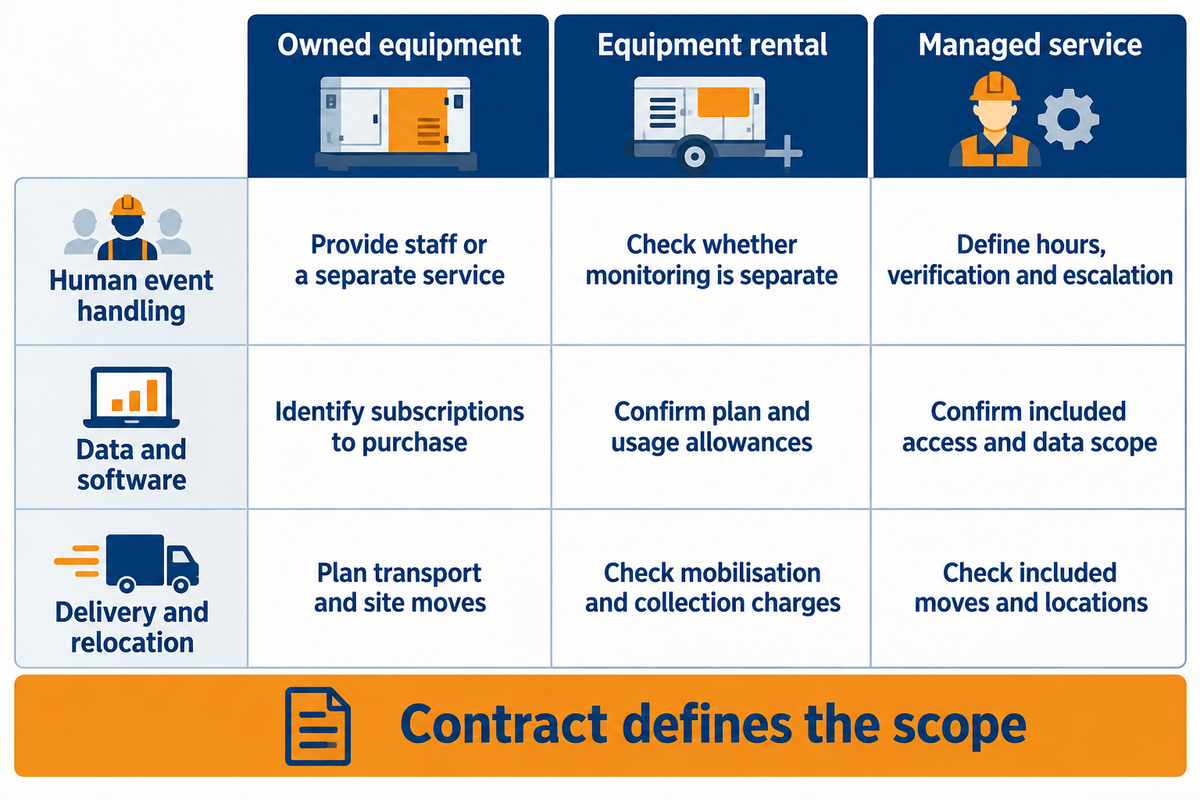
Analyze purchase, equipment rental and managed monitoring options based on the equipment and the work included in the price. Ownership puts maintenance and service coordination with the buyer unless contracted elsewhere. A rental may provide hardware only, while a managed package may include communications, operators and support. Those differences may outweigh the equipment price.
Should I buy or rent a mobile surveillance trailer?
Buy when the trailer has recurring work across your sites and you’re able to manage maintenance and connectivity and monitoring arrangements. Rent for a short or uncertain project, especially when justifying capital expenditure and storage wouldn’t be practical. A managed service is most appropriate when operating responsibility and staffed event handling are the focus of the requirement.
A real-world procurement example illustrates the useful comparison isn’t always the cheapest. In a February 24, 2025 Lewiston police memo, the department recommended Minuteman Security’s bid for a surveillance trailer at a price of USD 38,640.15. The memo states that offers over USD 41,000 exceeded the HSI budget, and the other options didn’t meet their current system requirements. The decision combined a budget ceiling with compatibility. That historic recommendation isn’t proof of an award made, and the cost may not reflect current prices. With a new requirement, compare offers and treat the costs as alternatives only after confirming that the offers meet the same functional requirement.
Ensure “included” defines the service level and the responsible party, and that “separate” defines an additional contract or site work.
| Cost or responsibility | Owned equipment | Equipment rental | Managed service |
|---|---|---|---|
| Asset ownership | Buyer retains asset | Supplier retains asset | Contract defines equipment arrangement |
| Delivery and relocation | Plan transport and site moves | Check mobilisation and collection charges | Check included moves and locations |
| Data and software | Identify subscriptions to purchase | Confirm plan and usage allowances | Confirm included access and data scope |
| Human event handling | Provide staff or a separate service | Check whether monitoring is separate | Define hours, verification and escalation |
| Maintenance and energy | Budget visits, parts and charging | Divide supplier and site duties | Define outage and backup-charging duties |
| Footage and export | Choose retention and export tools | Check retrieval after the unit is returned | Define incident preservation and footage handover |
| Outage coverage | Arrange spare equipment or a repair plan | Check replacement availability and charges | Define interim coverage during a fault |
| Technical support | Arrange helpdesk and callout contacts | Check remote help and field-visit scope | Define fault reporting and support hours |
| End of project | Redeploy, store or dispose of asset | Check return and extension terms | Check termination and footage export |
Calculate the total cost of ownership for the period of use, including time that the equipment is idle. Finance needs the total cost of ownership over the planned use period, including idle time. Operations needs coverage while a unit is serviced or moved. Use the two-option project cost comparison after aligning those inputs; do not assume a monthly service fee is directly comparable with a one-time hardware price.
Deployment, Maintenance and Privacy
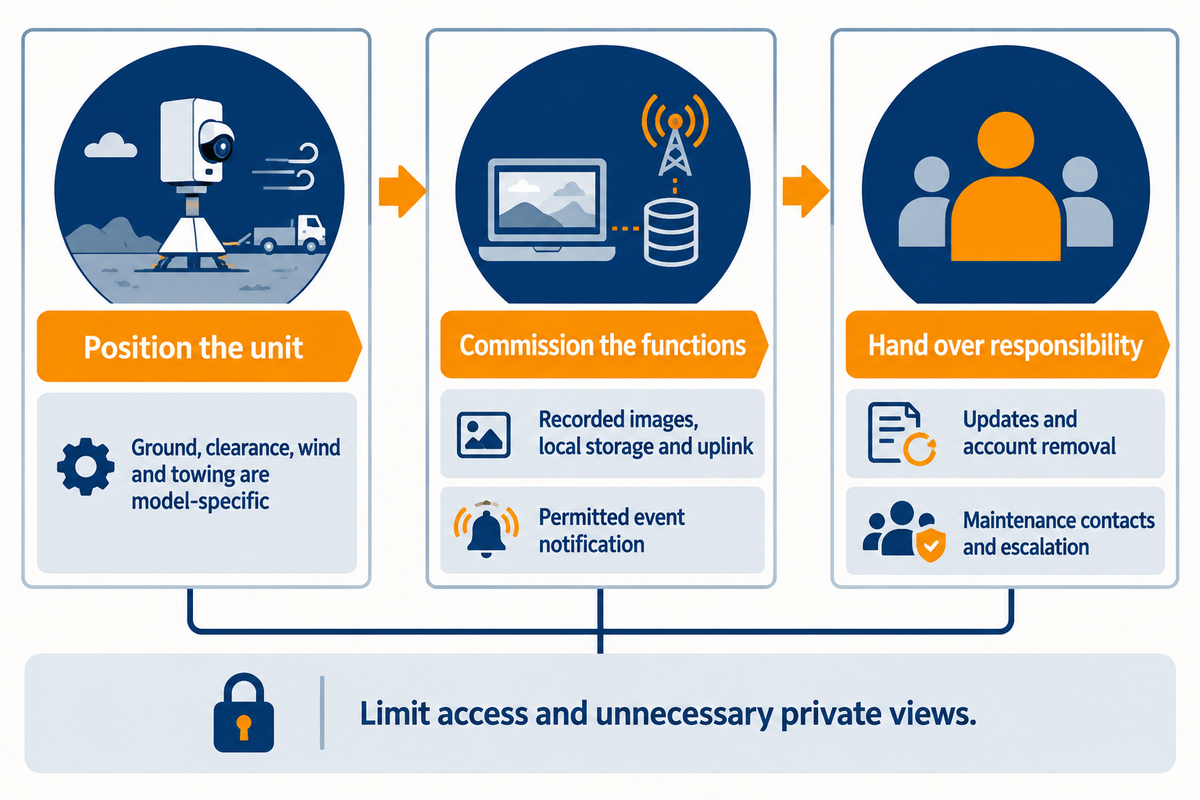
Deployment succeeds if the trailer is positioned safely, records the required images and the operating team is able to manage the equipment and access. Many constraints are model-specific: ground conditions, clearance, wind limits and towing requirements. Privacy also needs a defined field of view, controlled access to footage and a retention policy suited to the site.
Check the route before you tow the trailer into place. Be sure to confirm the following: towing compatibility, ground bearing, stabilizer placement, overhead clearances, and vehicle circulation. Follow the specific model’s instructions for raising, securing, and lowering the mast. A short demonstration doesn’t address all site conditions or time required to commission the cameras and connections.
- Position the unit — establish a stable location, safe clearances and useful views.
- Commission the functions — check recorded images, local storage, uplink and a permitted event notification.
- Hand over responsibility: provide operators access details, maintenance contacts, and escalation procedures.
Security and surveillance teams should check the lenses, camera alignment, charging surfaces, batteries, tires, couplings, locks and equipment enclosure. Be sure to check equipment and lighting needs after a relocation or a change in the work area. Lighting needs deserve their own review; the mobile lighting systems guide explains the wider lighting context.
Access, privacy and shared responsibility
NIST’s IoT cybersecurity guidance names data protection and secure software update capabilities as device functions. Limit access to only the minimum required to perform a job, and separate administrator permissions. Identify who installs updates and who removes accounts; enable supported account protections and remove accounts for staff and service providers who no longer need access.
A 2024 FTC security-camera enforcement account alleged failures involving passwords, encryption and network controls. Remote surveillance creates another access route to sensitive footage; reliable recording does not by itself protect that route. Use unique credentials, multifactor authentication where supported, and a defined process for revoking remote access.
Avoid unnecessary private areas, and restrict audio or biometric functions according to the project’s requirements and applicable regulations. For industrial locations, check the complete installation to ensure that the apparatus meets the applicable regulations. An explosion-proof certificate for a portable lighting fixture doesn’t mean that a camera trailer meets the regulations for an explosion-proof location.
What Is Changing: Equipment Versus Managed Monitoring
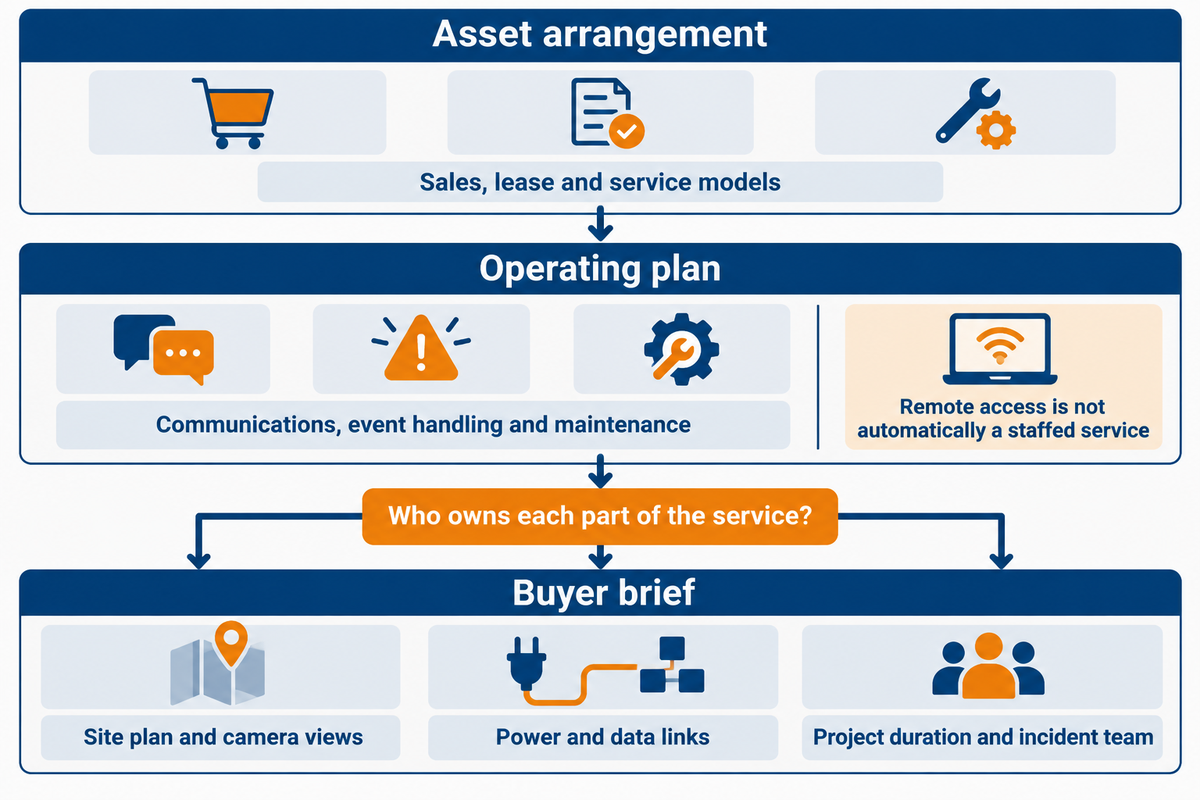
Customers are seeing equipment and operating services in the same bundle, so a good question is who owns each part of the surveillance service. A rugged mobile security platform can provide temporary coverage, but to be useful it must integrate communications, software, event handling, and maintenance under the package’s operating plan.
In January 2026, SDM interviews outline various sales, lease and service models used by suppliers. Identify whether an offer transfers an asset, grants a right to use that asset or supplies an operating service. A trailer with remote monitoring is not automatically a staffed service, and a monitoring contract does not automatically include every relocation or repair.
Standards impact how requirements are expressed. For example, the October 2025 edition of IEC 62676-4 provides a recent reference point for application planning for surveillance. An existing installation may have been designed around older terms; for any upgrades, take along the edition and provide the actual viewing task. When replacing cameras, try to ensure the result matches the intent, and do not rely on repeated labeling.
In the security industry, advanced surveillance technology adds options for classifying activity and managing fleets, but the buying decision still reaches the same practical questions. Can a user distinguish authorized work? Can footage be exported with time information? Who notices a dead charger? Who owns a dead-charger notification that nobody acknowledges? Monitoring capabilities are valuable when the operating arrangement answers those questions.
For a new job, expect to see a site plan and camera views, as well as projected operating hours, available power and data links. Add the expected project duration and the team that will handle incidents. Those inputs help separate the equipment discussion from the service discussion before quotes arrive.
LFADJ’s Mobile Surveillance Trailers solution page is the next step for a configuration discussion. Use this guide to define the job and then discuss equipment and any separately agreed monitoring or support arrangements, if any, against that definition.
Frequently Asked Questions
What power sources do mobile security trailers use?
Batteries can be charged by solar panels, mains electricity or a generator, according to the installed configuration.
Solar-powered mobile surveillance uses charging conditions at the site together with stored battery energy. Mains charging is useful where a suitable supply exists; generator support can address periods of poor solar charging. When planning the package consider all continuous and intermittent loads. The power arrangement should address low-battery warnings and define the task for the crew to charge the batteries, so the recorder and communications equipment are part of the energy plan.
Do mobile security trailers require permanent installation?
Mobile security trailers are designed for relocatable use, but each deployment still needs a suitable position and proper commissioning.
A mobile security system can eliminate the need to build a permanent camera pole or trench a new cable for a short term project. Servicing the trailer presents challenges, e.g. clearances and safe access, and equipment alignment and calibration at the new location. The instructions for use govern operation and don’t change just because the equipment is towed.
Can mobile security trailers be used for large events?
Yes, they can provide temporary viewpoints for event entrances, parking areas and selected perimeter locations.
Plan views around expected obstructions, routeways and a likely event layout. Mobile video surveillance can give staff context across a changing area, while security personnel handle admission and physical intervention. Confirm uplink capacity under event conditions, permissions for viewing footage and the escalation route for an incident. A single elevated camera doesn’t give security coverage for all queues, entrances and concealed areas; critical areas may require a dedicated view.
Who delivers and sets up the camera trailers?
The supply or rental contract should identify delivery, positioning and commissioning responsibilities.
Some packages incorporate those tasks; others omit transport and/or site prep. Confirm the handover test and who returns after relocating.
Are mobile surveillance trailers NDAA compliant?
No category-wide NDAA approval applies to every mobile surveillance trailer; assess the actual equipment and services against the applicable procurement requirements.
For relevant U.S. federal contracting, FAR 52.204-25 addresses covered telecommunications and video-surveillance equipment and services, including specified entities and uses within the clause’s scope. Compare the actual camera, recorder, and communications equipment and services to the requirements in the solicitation. Be sure to keep the component identities and the representations made by the offeror. A certificate for unrelated lighting equipment does not establish the camera system’s status, and an equipment statement does not establish that a monitoring service meets every contract requirement. The applicable solicitation and contracting rules determine the required evidence.
Can mobile security trailers be relocated easily?
Relocation is part of their purpose, provided towing, site access and the model’s operating instructions are followed.
Lower and secure equipment as instructed before moving. Upon reaching the new location, confirm stability and the field of view of the cameras. Check the charging conditions at the new position, check if the recording is taking place, and check the connection to the network.
References & Sources
- What’s the Buzz About Security Trailers? SDM, January 26, 2026.
- Closed Circuit Television Surveillance practice profile National Institute of Justice; historical review of general CCTV.
- IEC 62676-4:2025 application guidelines official public scope and edition details.
- PVWatts Calculator catalogue Department of Energy.
- Digital Video Exchange Standards NIST.
- AVS-01 for Monitoring Centers The Monitoring Association.
- Finance Committee packet: February 24, 2025 police memo City of Lewiston, PDF page 9.
- IoT Cybersecurity Program FAQs NIST.
- 2024 security-camera enforcement account Federal Trade Commission.
- FAR 52.204-25 Acquisition.gov.