Get in touch with LFADJ Company

This document was updated in November 2026 and reviewed by the Zhejiang Longfa Lighting Co., Ltd. technical team.
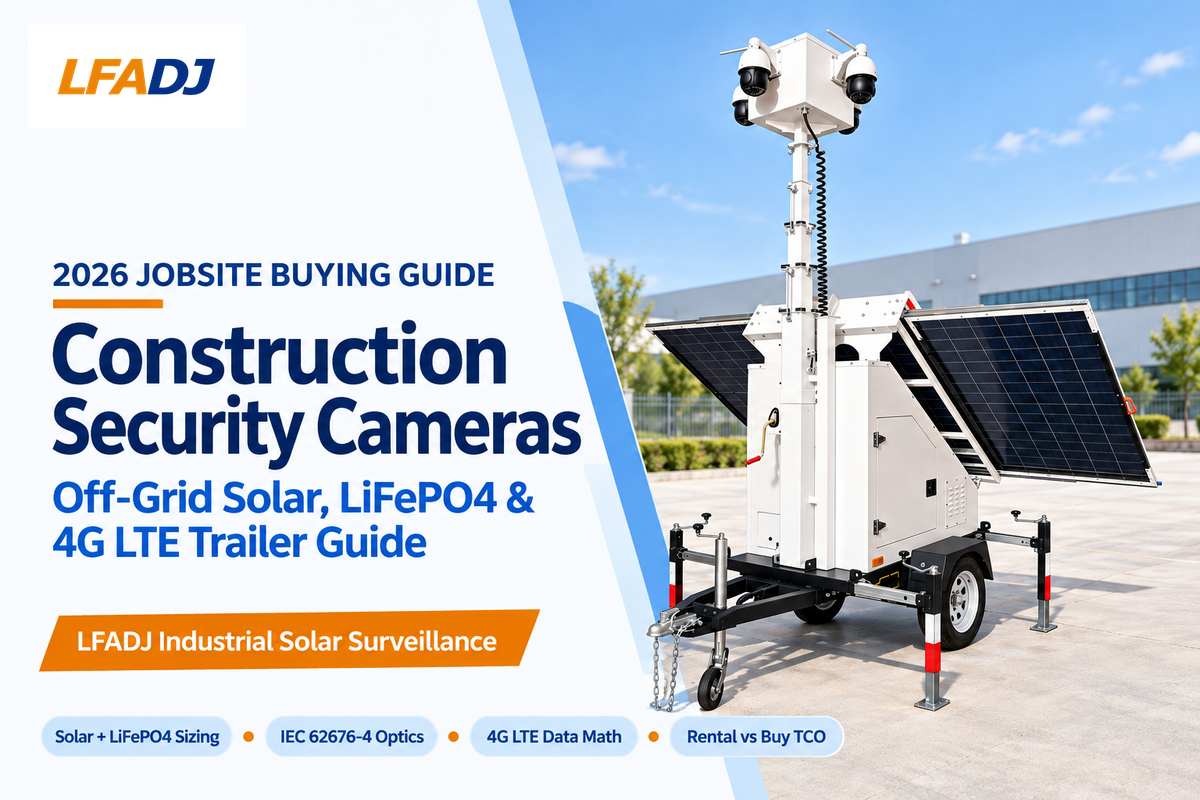
Off-grid construction security cameras protect active jobsites without grid outlets or broadband by using a combination of solar arrays, LiFePO4 batteries, and cellular uplinks. According to the National Equipment Register (NER), annual theft of heavy equipment in the U.S. ranges from $300 million to $1 billion. The National Insurance Crime Bureau (NICB) states that the chances of recovering equipment are less than 20 percent. Passive retail security cameras alone don’t substantially impact after-hours loss of copper, tools and/or heavy equipment.
When choosing a camera system, there are four things to measure. First, match your site’s utility stage to your power and network architecture. Second, size solar wattage, cold-weather battery storage, and H.265 data budgets for winter overcast spells. Third, check optical pixel density against the 2025 IEC 62676-4 update, IP66/IP67 ingress ratings, and IK10 impact protection. Fourth, compare 12-month and 24-month costs across standalone units, managed rentals, factory-direct trailers, and physical security guards.
Quick Answer: Jobsites without grid power or Wi-Fi need independently powered cameras, locked perimeter barriers, and onboard recording. Use solar 4G LTE units or mobile surveillance trailers where cellular coverage exists, and add satellite connectivity or local-only NVR storage in cellular dead zones. Size off-grid multi-camera rigs for 50–150 W continuous loads (1.2–3.6 kWh/day). Use H.265 event-clip uploads instead of continuous streaming: DCSpeedTest calculates that one continuous 4K H.265 stream at 6.0 Mbps consumes 1,944 GB per month.
Disclosure: This buying guide is published by LFADJ (Zhejiang Longfa Lighting Co., Ltd.), manufacturer of mobile surveillance trailers and temporary jobsite lighting. In this buying guide, we compare managed rental fleets, SaaS platforms, retail units and our S973 mobile surveillance trailer against published specifications and verifiable public benchmarks.
What Security Camera Setup Is Needed on a Construction Site Without Power or Wi-Fi?
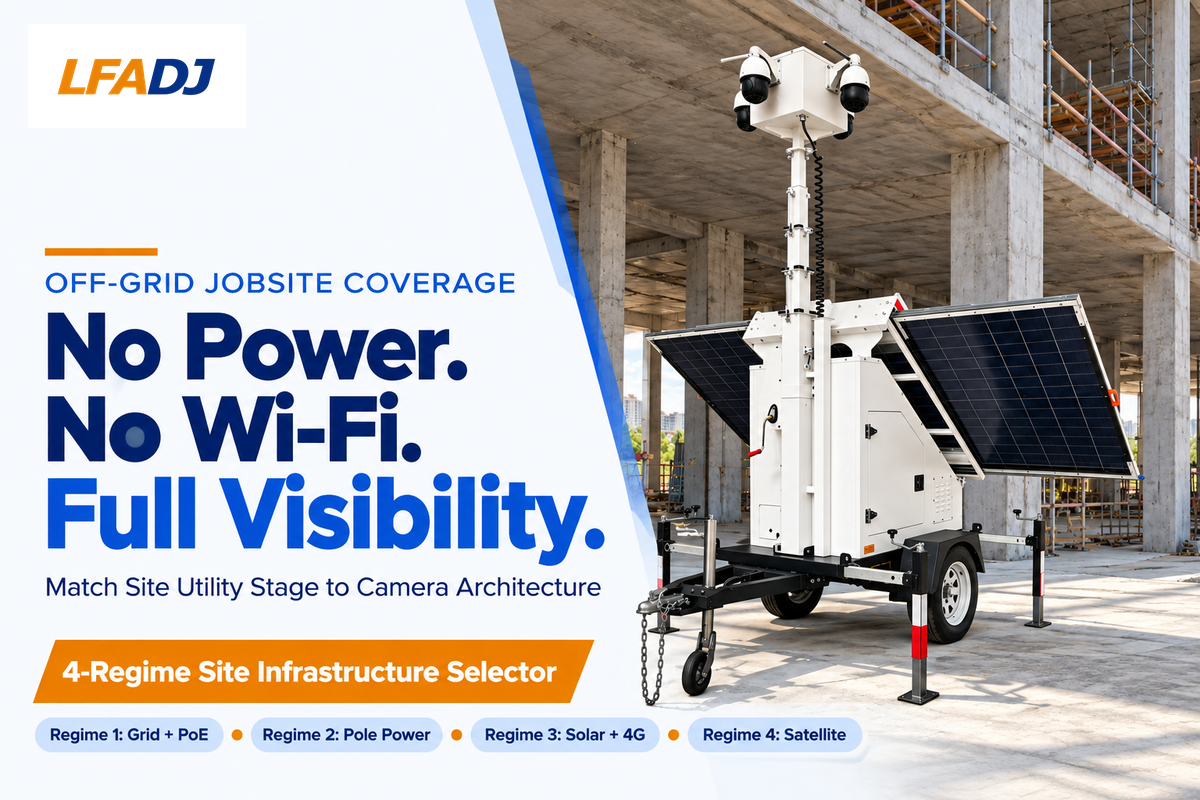
Pair independently powered solar 4G LTE cameras or mobile surveillance trailers with locked chain-link fencing, steel tool containers, and onboard recording. In cellular dead zones, replace cellular alerts with a satellite uplink or local NVR storage paired with guard patrols. During early phases of construction, when utilities aren’t yet available, layers of perimeter protection are warranted.
Grading lots in green field development typically take six months or longer to get utility drops. A report by Mordor Intelligence states that temporary utility extensions to remote sites can cost $15,000 to $30,000 per mile, separate from single-drop utility service connections. While waiting for utility service connections and permanent power, construction staging yards can be exposed to loss and theft of heavy machinery and equipment. Drone Strategic Partners cites $300 million to $1 billion in yearly U.S. heavy equipment theft. It also cites a Construction Equipment Guide 2025 analysis putting average heavy machine theft losses at $30,000 per incident, with copper theft adding further exposure.
Employing physical and electronic barriers and sensors can reduce gaps in perimeter security. Guidance from the Canton Police Department and Fairfax County Police Department suggests see-through chain-link fences, locked lay-down boxes, and external lighting as the most appropriate perimeter controls. Privacy wrap can conceal intruders from surveillance, whereas transparent chain-link fencing keeps installations visible and helps protect perimeters. Flimsy, orange plastic mesh fencing can be cut or climbed, and provides a weak barrier against jobsite theft. A construction site security camera then watches the choke points steel fences slow down.
Off-grid jobsite security splits into cellular-covered lots and true cellular dead zones. Where there’s reliable 4G or 5G reception, cellular security cameras use solar power from a deep cycle battery bank without wifi. An onboard router links multiple cameras to that cellular uplink cleanly. For remote rural builds without cell towers, crews add either a Starlink terminal or local NVR storage with guard patrols. Shaded winter sites can use hybrid solar-and-generator tower power to keep batteries charged through storms.
Use the 4-Regime Site Infrastructure Selector below to match your utility situation to the right camera setup prior to asking for vendor quotes. Consumer single-lens battery cameras have small internal batteries that can’t always survive the demands of high event traffic, and narrower fields of view that aren’t as large as those covered by multi-lens mast cameras.
| Site Utility Regime | Primary Power Source | Network Backhaul | Recommended Camera Setup | Key Operational Limit |
|---|---|---|---|---|
| Regime 1: Grid + Broadband | AC power + PoE switch + UPS | Site fiber or business ISP | Hardwired PoE cameras + local NVR | Fixed conduit blocks relocation during earthwork |
| Regime 2: Temporary Power Only | Temporary pole AC/DC + battery UPS | 4G LTE or 5G cellular router | Pole-mounted cellular box + dual cameras | Loses grid feed if panel breakers trip after hours |
| Regime 3: Off-Grid + Cellular | Solar power + LiFePO4 battery bank | Multi-carrier 4G LTE / 5G SIM | Solar surveillance trailer or standalone solar 4G camera | Needs unobstructed sun window and winter battery margin |
| Regime 4: Off-Grid Dead Zone | Oversized solar + hybrid backup charger | Starlink satellite or local-only NVR | Solar trailer + satellite modem + onboard NVR | Satellite terminals add continuous DC draw that varies by terminal model and snow-melt mode |
Visible deterrence matters just as much as camera resolution on dark sites. Active floodlights allow for color identification. Infrared night vision reduces continuous battery draw on solar trailers, allowing security measures to run through the night.
Wired PoE vs. Cellular Pole Cameras vs. Solar Surveillance Trailers: Which Fits Your Jobsite?
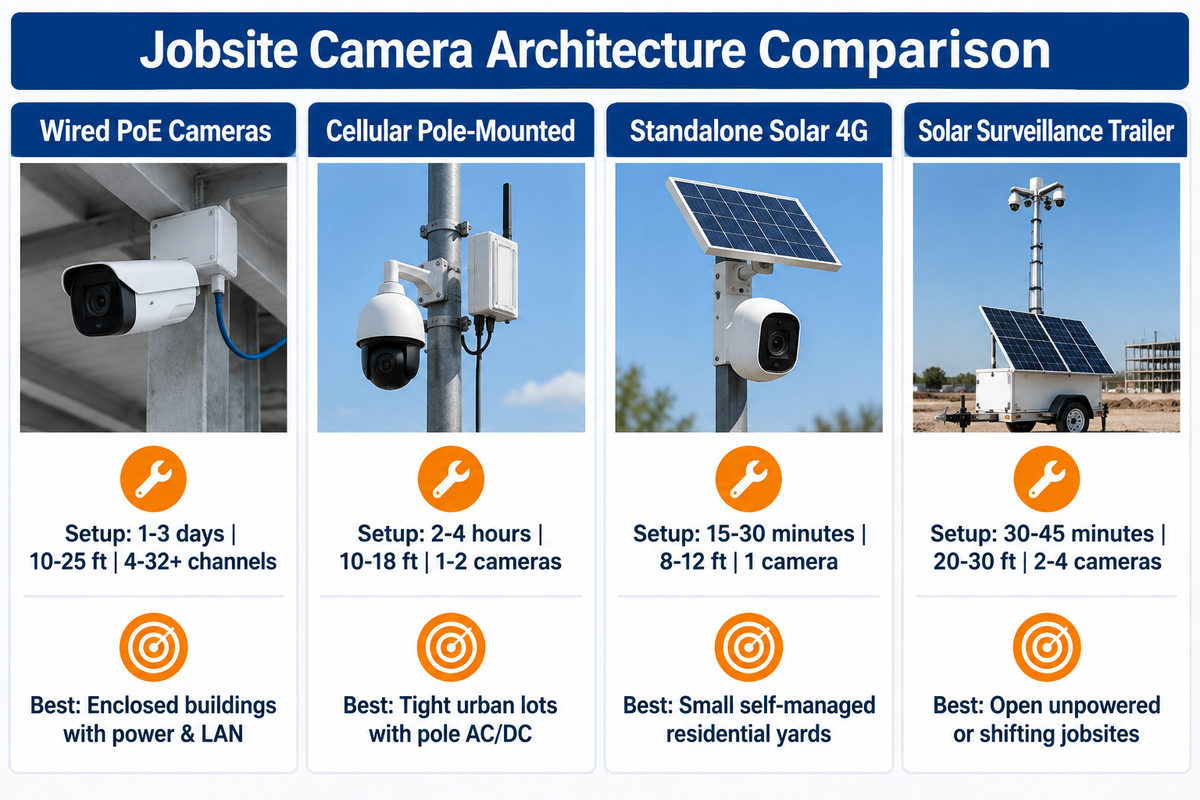
Yes, wireless solar trailers are better than wired systems for open, unpowered, or shifting jobsites. Wired PoE cameras are better for enclosed buildings with permanent power and network drops. Cellular pole boxes are better for urban, temporary pole power. Per Eyrus, trailers position in 30–45 minutes (as fast as 30 minutes for basic setup), while wired install labor runs $100–$400 per standard camera and $300–$800 per PTZ, thermal, or LPR unit.
Most project managers think that cellular connectivity eliminates the need for power planning. Cameras can still connect via internal Ethernet or Power over Ethernet (PoE) within the trailer. Without solar panels and deep-cycle storage, a cellular unit still needs a dedicated battery pack or an external AC or DC power feed, such as one from a temporary power pole. Treating wireless outdoor cameras as zero-power hardware causes outages whenever batteries deplete or site panels shut down.
Installation speed and trenching risk separate these four architectures in the field. Trade coverage in Construction Executive shows how turnkey mobile rigs remove onsite IT setup and underground CCTV trenching. Technicians on Reddit’s r/videosurveillance favor trailers during earthwork because towing a mast beats pulling cable that excavators later cut. Towing, leveling, and raising a trailer mast typically takes 30–45 minutes, compared with multi-day conduit runs for wired PoE.
Elevation and ground footprint create clear physical trade-offs. Pole-mounted cameras typically sit 10 to 18 ft up on a temporary utility or light pole. Commercial solar trailers raise telescopic mast systems for cameras and lighting to 20–30 ft. Patent US8833985B2 spans 8–30 ft, and the LFADJ S973 reaches 7,000 mm (22.97 ft). That elevation clears stacked lumber and shipping containers. However, the S973’s stated deployed footprint is 2.65 × 2.45 m plus outrigger clearance, and transport requires a tow setup rated for 800 kg (1,764 lb).
| Evaluation Dimension | Wired PoE Cameras | Cellular Pole-Mounted | Standalone Solar 4G Camera | Solar Surveillance Trailer |
|---|---|---|---|---|
| Power Source | Ethernet PoE from AC switch | External AC/DC pole feed + mini UPS | Compact solar panel + internal battery | 1,000–2,600 Wp array + 5–13.5 kWh LiFePO4 (sized to DC load) |
| Data Link | Wired LAN / site broadband | 4G LTE / 5G cellular modem | Built-in 4G SIM slot | Dual-SIM 4G/5G or Starlink |
| Typical Setup Time | 1–3 days (cabling + mounting) | 2–4 hours (pole clamp + power) | 15–30 minutes (strap or bracket) | 30–45 minutes (tow, level, raise mast) |
| Mounting Elevation | 10–25 ft on structure | 10–18 ft on light or utility pole | 8–12 ft on fence post or tree | 20–30 ft (LFADJ S973: 22.97 ft / 7 m) |
| Cameras Per Unit | 4–32+ channels on one NVR | 1–2 cameras per pole box | 1 camera per unit | 2–4 cameras (fixed + PTZ) |
| Relocation Effort | High (re-pull conduit and cable) | Medium (lift truck + power drop) | Very low (unbolt and move) | Low (retract mast and tow by pickup) |
| Ground Footprint | Zero ground space | Zero ground space (uses pole) | Zero ground space | 2.65 × 2.45 m deployed + outrigger clearance |
| Active Deterrence | Optional horn/strobe on PoE | Compact strobe + talk-down speaker | Small built-in spotlight + siren | High-output LED strobes, horn, live audio |
| Continuous Recording | 24/7 local NVR storage | 24/7 local NVR or edge SD | Motion-triggered only (battery limit) | 24/7 local NVR + cellular event alerts |
| When NOT to Choose | Open grading lots before framing or trenching | Sites lacking external AC/DC power or dedicated battery kit | Commercial yards needing 24/7 multi-angle tracking | Zero-lot-line urban infill lacking trailer + outrigger clearance |
Paying trailer rental rates for a tight single-gate urban lot that already has a temporary power pole wastes budget. In zero-lot-line zones, trailers and pole-mounted cameras serve different functions. A pole box frees up ground space for concrete trucks and keeps other cellular alerts active. On the other hand, trenching PoE conduit across an open grading site could result in cable cuts, which are expensive, especially if the cable is cut during earthwork to install utility or footing trenches.
When Should You Switch From a Solar Trailer to Wired PoE Cameras?
Switch from a solar trailer to wired PoE cameras once the building shell is dried in, permanent building power is energized, and site broadband reaches the main electrical room. On a multi-story building, keep the trailer covering exterior laydown yards and use PoE cameras to cover corridors, stairways, and copper rough-in rooms.
PoE cameras can be used to cover interior spaces and areas before the exterior trailer is moved. Exterior trailers can’t cover interior spaces and areas, for example, between framed floors where tools and switchgear are located. As the trailer is moved to a new location, on-site cameras can be used to cover the site.
How to Size Solar Panels, LiFePO4 Batteries, and 4G LTE Cellular Data for Off-Grid Jobsite Cameras
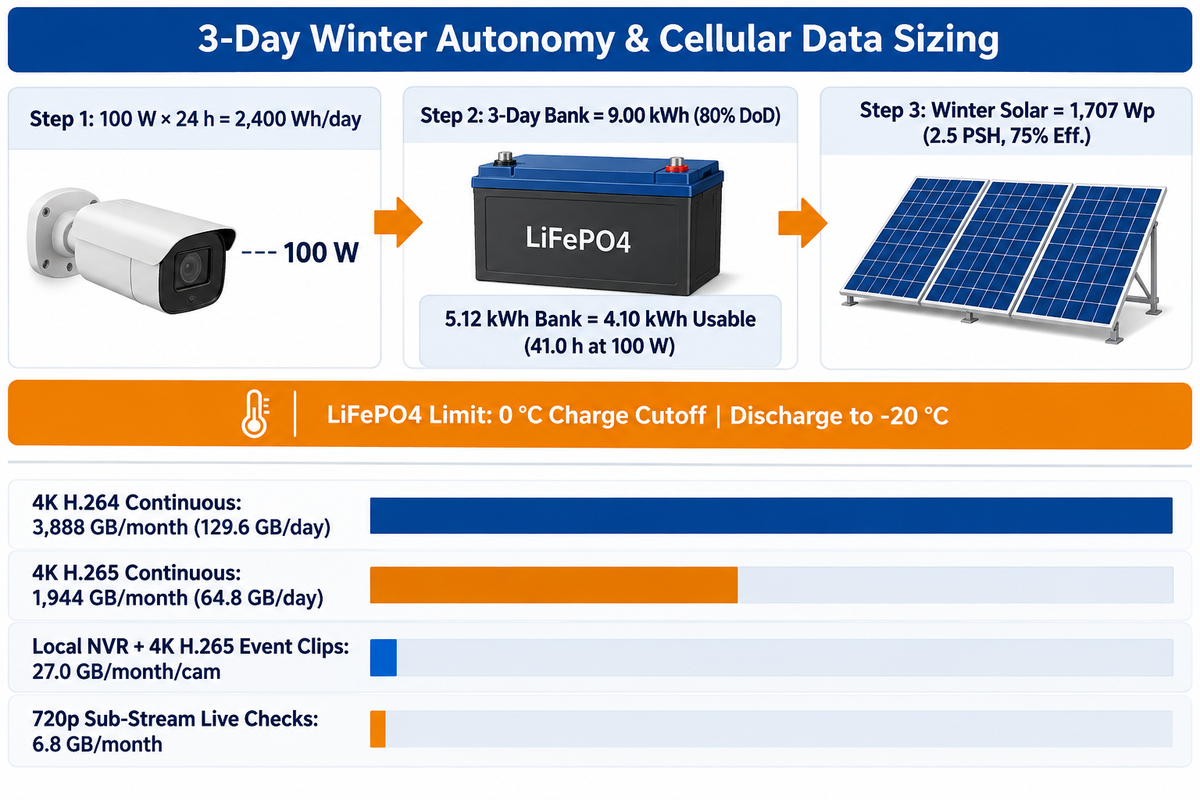
An off-grid camera rig drawing 50–150 W consumes 1.2–3.6 kWh per day. A 5.12 kWh nominal LiFePO4 bank (80% usable, or 4.10 kWh) delivers 27 to 82 hours of no-sun autonomy. Size solar panels for worst-month sun plus recharge recovery: at 2.5 peak sun hours, 75% efficiency, and a 3-day recovery window, a 100 W load needs 1,707 Wp. Record continuously locally and upload event clips over 4G LTE.
Matching solar panel nameplate wattage to average annual sunlight causes mid-winter blackouts. Contractors on Reddit’s r/homesecurity report that undersized solar camera rigs lose battery life during winter storms or dust buildup. Winter days cut peak sun hours sharply. Every watt-hour drawn overnight must recharge alongside the daytime camera load once clouds clear.
Cold weather adds a second electrical limit on lithium iron phosphate (LiFePO4) packs. Standard LiFePO4 cells discharge down to −20 °C (−4 °F). However, technical guides from LiTime and Expion360 warn that charging below 0 °C (32 °F) risks irreversible anode lithium plating depending on cell design, charge rate, and state of charge. A BMS low-temperature charge cutoff halts charging below 0 °C (32 °F) to prevent plating. Without that cutoff, cold charging continues and can damage cells; with a cutoff but no self-heating pad, freezing mornings stall solar recharging until cells warm. Patent US8833985B2 addresses winter reliability using MPPT charge controllers, dual battery banks, and secondary AC/DC backup charging.
3-Day Winter Autonomy & Cellular Data Sizing Playbook
Follow the 3-Day Winter Autonomy & Cellular Data Sizing Playbook to audit any off-grid quote before purchase. Suppose an off-grid solar trailer runs a continuous 100 W DC load across four IP cameras, an NVR, and a 4G LTE router. Assumed engineering inputs: 24-hour duty cycle, 80% usable LiFePO4 depth of discharge (DoD), 75% net solar-to-battery efficiency (MPPT, wiring, dust, and tilt losses), 2.5 worst-month peak sun hours (PSH), and a 3-day recharge recovery window.
Step 1 calculates daily energy: 100 W × 24 h = 2,400 Wh/day (2.40 kWh/day). Step 2 calculates 3-day (72-hour) nominal battery size: (2,400 Wh × 3 days) ÷ 0.80 DoD = 9,000 Wh (9.00 kWh). By comparison, a 5.12 kWh nominal bank (such as the LFADJ S973’s 25.6 V, 200 Ah pack) yields 4.10 kWh usable energy at 80% DoD. That bank runs a 100 W load for 41.0 hours or a 50 W load for 81.9 hours without sun. Step 3 checks solar recharge. Replacing 2,400 Wh/day while refilling one day’s 2,400 Wh deficit across the 3-day recovery window adds 800 Wh/day, or 3,200 Wh/day total. At 2.5 PSH and 75% efficiency, recharge needs 3,200 ÷ (2.5 × 0.75) = 1,707 Wp of solar. A 1.35 kWp array (3 × 450 Wp on the S973) handles 50–75 W winter loads cleanly. Northern sites drawing 100–150 W need extra panels or generator top-ups. Run your local ZIP code through our surveillance trailer energy budget worksheet.
On standard SIM data plans, record continuous 4K video locally and send only event clips and on-demand live view over cellular. According to DCSpeedTest, H.264 (Legacy AVC) requires 10–14 Mbps of continuous upstream bandwidth per 4K (8.3-megapixel) 20 FPS camera, whereas H.265 requires 4–7 Mbps (a 50% reduction). Even at 6.0 Mbps H.265, one continuous stream burns 64.8 GB per day, or 1,944 GB (1.94 TB) per month. NVR bitrate tables from SCW also show H.265 cutting 4K bitrate in half, versus H.264. Off-grid rigs equipped for 24/7 continuous recording to local NVR drives send motion alerts, H.265 event clips, and live checks from the 4G cameras over the cellular link. Under the table’s 20-minute/day event profile, that split uses about 27 GB/cam/month, plus about 6.8 GB for 720p sub-stream checks. Check multi-camera drive retention using our video storage planning calculator.
| System Profile / Stream Type | Load or Bitrate | Daily Demand | Autonomy / Monthly Volume | Recommended Off-Grid Sizing Action |
|---|---|---|---|---|
| Single Solar 4G Rig (25 W) | 25 W continuous DC | 0.60 kWh/day | 163.8 h on 4.10 kWh usable | 427 Wp winter solar covers 2.5 PSH recharge |
| 2-Cam Solar Pole Rig (50 W) | 50 W continuous DC | 1.20 kWh/day | 81.9 h (~3.4 days) usable | 853 Wp winter solar; fits 1.35 kWp S973 array |
| 4-Cam Trailer Base (100 W) | 100 W continuous DC | 2.40 kWh/day | 41.0 h (~1.7 days) usable | Add 2nd battery (10.24 kWh) for 3-day northern winter |
| 4-Cam + Satellite / Heater (150 W) | 150 W continuous DC | 3.60 kWh/day | 27.3 h (~1.1 days) usable | Needs 13.5 kWh bank + 2.6 kWp solar or hybrid charger |
| 4K 20 FPS H.264 Continuous (1 Cam) | 10–14 Mbps (12 avg) | 129.6 GB/day | 3,888 GB/month | Store locally on NVR; avoid routing over standard SIM |
| 4K 20 FPS H.265 Continuous (1 Cam) | 4–7 Mbps (6.0 avg) | 64.8 GB/day | 1,944 GB/month (DCSpeedTest) | Record to local NVR/SD; 50% savings vs H.264 |
| 4K H.265 Event Clips Only (1 Cam) | 6.0 Mbps × 20 min/day | 0.90 GB/day | 27.0 GB/month per camera | Size SIM pool by total camera count (e.g., 4 cams ≈ 108 GB) |
| Sub-Stream Live View (720p H.265) | 1.0 Mbps × 30 min/day | 0.23 GB/day | 6.8 GB/month | Use sub-stream for phone checks; pull 4K clips on demand |
| LiFePO4 Cold-Charge Limit | 0 °C (32 °F) charge threshold | Discharge to −20 °C | Charge halts below 0 °C until warmed | Require BMS charge cutoff + self-heating pad in frost zones |
Signal strength at the height of the antenna is also very important, along with the total amount of data you’re allotted each month. Reception inside steel-framed shells or deep excavations can fall below the outdoor and in-vehicle coverage that carrier maps like the FCC National Broadband Map report. Test the upload throughput of the carrier at the planned height of the mast before parking a solar trailer. When using solar panels near tower cranes and scaffolding, look for shadows, and park the trailer outside of the swing zone.
Do Construction Site Security Cameras Keep Recording If Cellular Internet Goes Out?
Yes, most commercial construction site security cameras keep recording while cellular is down, as long as the model has an onboard NVR hard drive or industrial microSD card. Cloud-only cameras without local storage can lose footage when a cellular outage or severe congestion prevents uploads.
Local recording is your primary evidence vault at sites without Wi-Fi. When 4G LTE connectivity returns, NVRs and cloud portals equipped with automatic network replenishment (edge-to-cloud backfill) automatically sync flagged alarm clips. For higher uptime, published PCT application WO2025155336A1 (LiveView Technologies) documents self-healing power relays that reboot hung cellular modems without a technician driving to the job site.
Camera Placement, PTZ vs. Fixed Bullet Optics, Night Vision, and Weatherproofing Standards
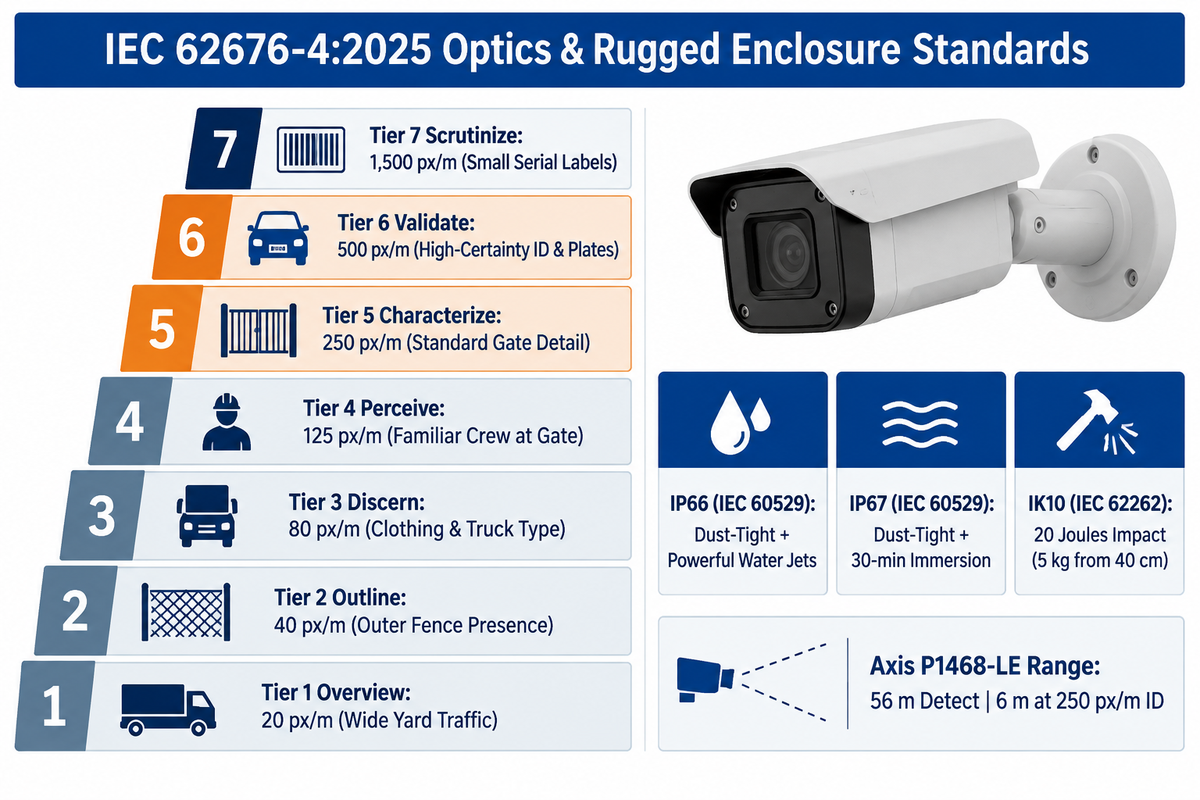
Pair a fixed wide-angle camera with an auto-tracking PTZ camera so the wide-angle camera captures a priority zone while the PTZ is zooming. Specify 250 px/m under IEC 62676-4:2014 Identification or 500 px/m under the October 2025 Validation update. Require IEC 60529 IP66/IP67 ingress ratings and IEC 62262 IK10 impact housings.
Relying on one PTZ camera is a common camera placement mistake on active construction jobsites. Often times when a PTZ tracks a northbound truck, the south copper cage is left unwatched. Installing a few fixed bullet cameras along the perimeter reduces blind spots while reserving PTZ cameras for active zoom tracking. Mounting lenses at the right height can help provide clear views of faces and license plates.
Optical clarity tracks pixel density delivered at the target distance, not headline megapixels. For over a decade, planners have used the four DORI levels defined in IEC 62676-4:2014 (Detection 25 px/m, Observation 63 px/m, Recognition 125 px/m, and Identification 250 px/m) per Axis Communications’ 2014 whitepaper. On October 9, 2025, the International Electrotechnical Commission published IEC 62676-4:2025 (Edition 2.0). Axis Communications’ November 2025 overview and the JVSG technical summary describe its seven tiers of operation, raising Validation to 500 px/m (152 px/ft) to counter compression and low-light noise.
“The 2025 edition refines pixel density requirements, accounting for higher-resolution digital IP cameras while considering factors like compression and noise.”
Real lens physics show how quickly identification range drops with distance. CCTVPLANNER.IO optical modeling of an Axis P1468-LE bullet (6.2–12.9 mm lens) yields 56 m for Detection, 22 m for Observation, 11 m for Recognition, and 6 m for 250 px/m Identification. Gate license plate capture requires fast shutter speeds and wide dynamic range (WDR). Mount those gate cameras at shallow angles so truck headlights don’t wash out reflective plates.
| Standard Tier / Rating | Threshold Value | Governing Standard | Practical Jobsite Application |
|---|---|---|---|
| Overview (2025 Tier 1) | 20 px/m (3 px/face) | IEC 62676-4:2025 | Wide yard traffic flow and crane staging overview |
| Outline (2025 Tier 2) | 40 px/m (6 px/face) | IEC 62676-4:2025 | Detecting human or vehicle presence near outer fence |
| Discern (2025 Tier 3) | 80 px/m (12 px/face) | IEC 62676-4:2025 | Seeing clothing color, tools carried, or truck type |
| Perceive (2025 Tier 4) | 125 px/m (20 px/face) | IEC 62676-4:2025 (2014 Recognition) | Confirming familiar subcontractor crew at gate |
| Characterize (2025 Tier 5) | 250 px/m (40 px/face) | IEC 62676-4:2025 (2014 Identification) | Standard close-range entry gate & tool crib detail |
| Validate (2025 Tier 6) | 500 px/m (152 px/ft; 80 px/face) | IEC 62676-4:2025 | High-certainty identity & plate detail under compression |
| Scrutinize (2025 Tier 7) | 1,500 px/m (240 px/face) | IEC 62676-4:2025 | Reading small delivery manifests or serial labels |
| IP66 Enclosure Rating | Dust-tight + powerful water jets | IEC 60529 | Baseline for concrete dust and wind-driven rain |
| IP67 Enclosure Rating | Dust-tight + 30-min temporary water immersion | IEC 60529 | Low mounts facing flooding; specify dual IP66/IP67 for water jets |
| IK10 Impact Resistance | 20 joules (5 kg mass dropped 40 cm) | IEC 62262 | Protects gate and mast domes from thrown debris or vandals |
Do Construction Cameras Work Effectively at Night and in Harsh Weather?
Yes, rugged outdoor construction cameras handle dust, rain, and darkness when IP66/IP67 and IK10 housings are paired with matched operating temperatures, heated optics against freezing rain, and IR or site lighting. Thermal cameras can detect heat signatures in zero-light yards, with detection range scaling by sensor resolution, lens focal length, and fog density. Optical cameras require IR or artificial light for facial detail.
Temperature swings can still shift focus or add sensor noise inside a sealed shell. The September 2024 standard IEC 62676-5-1:2024 defines repeatable image-quality tests under controlled cold (IEC 60068-2-1) and dry-heat (IEC 60068-2-2) conditions, focusing primarily on integrated-lens cameras and requiring selectable lenses to be stated alongside test results. Pairing low-light site cameras with properly aimed temporary lighting for construction sites also improves night color fidelity without blinding camera sensors.
Preventing Construction Site Theft: AI Motion Detection, Real-Time Alerts, and Live Remote Guarding
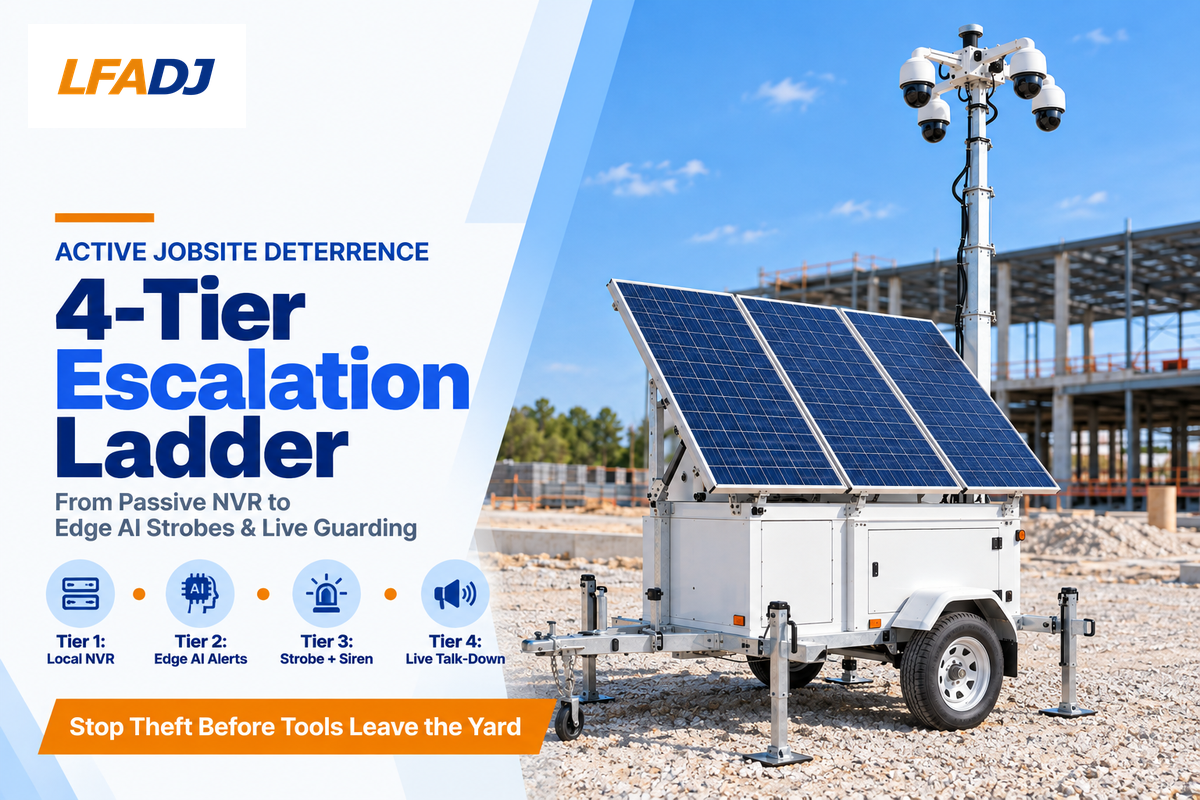
Stop active construction site theft by pairing edge AI person-and-vehicle detection with scheduled after-hours strobes, loudspeaker talk-down, or 24/7 live video monitoring. Passive local recording can capture evidence of copper and construction equipment theft, but motion-activated recording can also trigger alerts, flooding phones with windblown tarp alerts. Site managers can mute the alerts, but theft will continue.
The NICB recovery rate below 20 percent reflects low post-theft recovery odds across reported heavy equipment losses, with Construction Equipment Guide’s 2025 analysis (cited by Drone Strategic Partners) putting the average loss at $30,000 per stolen machine. One study by Piza et al. (2019) suggests that video-based security has a higher impact on crime reduction when coupled with both active monitoring and a combination of lighting and physical security. The study says that the highest level of crime reduction appeared in car-parking settings.
Alert fatigue affects more jobsite camera deployments than hardware failures. Basic pixel-based motion detection cameras fire when dust drifts past an IR illuminator, when tarps flap in the wind, or when headlights on a highway sweep across a fence. Once a superintendent gets repeated false pings at 2:00 a.m., notifications get silenced before a real intruder cuts the padlock. Edge AI on the camera chip filters targets at scheduled tripwires and can reduce false alarms and save cellular bandwidth. Objects in the frames are classified on the chip as humans or vehicles before the frames are transmitted.
Trade reporting in Construction Dive notes growing adoption of motion analytics and geofenced alerts to deter theft on high-value builds. Use the 4-Tier Jobsite Deterrence Escalation Ladder below to match your response workflow to asset risk. Contractors posting on Reddit’s r/Construction note that bright strobes and live voice challenges drive thieves off demolition and staging lots faster than silent recording.
| Escalation Tier | Detection & Response Mechanism | Who Responds | Best-Fit Jobsite Risk Level |
|---|---|---|---|
| Tier 1: Passive Local Recording | 24/7 NVR or SD capture; no push alert | Site team reviews after loss | Low-value residential builds needing insurance evidence |
| Tier 2: AI Self-Monitored Alerts | Edge AI person/vehicle tripwires + real-time alerts | Project manager or superintendent | Small commercial sites with low overnight foot traffic |
| Tier 3: Automated Active Deterrence | AI trigger fires LED floodlights, strobe, and siren | Automated hardware + app escalation | Mid-size copper rough-in or unstaffed weekend yards |
| Tier 4: 24/7 Live Remote Guarding | AI alert routed to SOC operator; live voice talk-down & live-witness dispatch | Staffed security operations center | High-value machinery, multi-acre builds, repeat theft zones |
When considering vendor proposals, separate self-monitored real-time monitoring from live remote guarding. Self-monitored real-time monitoring only sends a clip to your phone, which leaves you awake at 3:00 a.m. to call the police. In staffed monitoring for construction, the operator issues a direct voice warning naming the intruder’s clothing or vehicle. Police receive a live-witness dispatch call with higher priority than automated motion-sensor alarms.
Construction Security Camera Cost: Monthly Rental vs. Outright Purchase vs. Security Guards
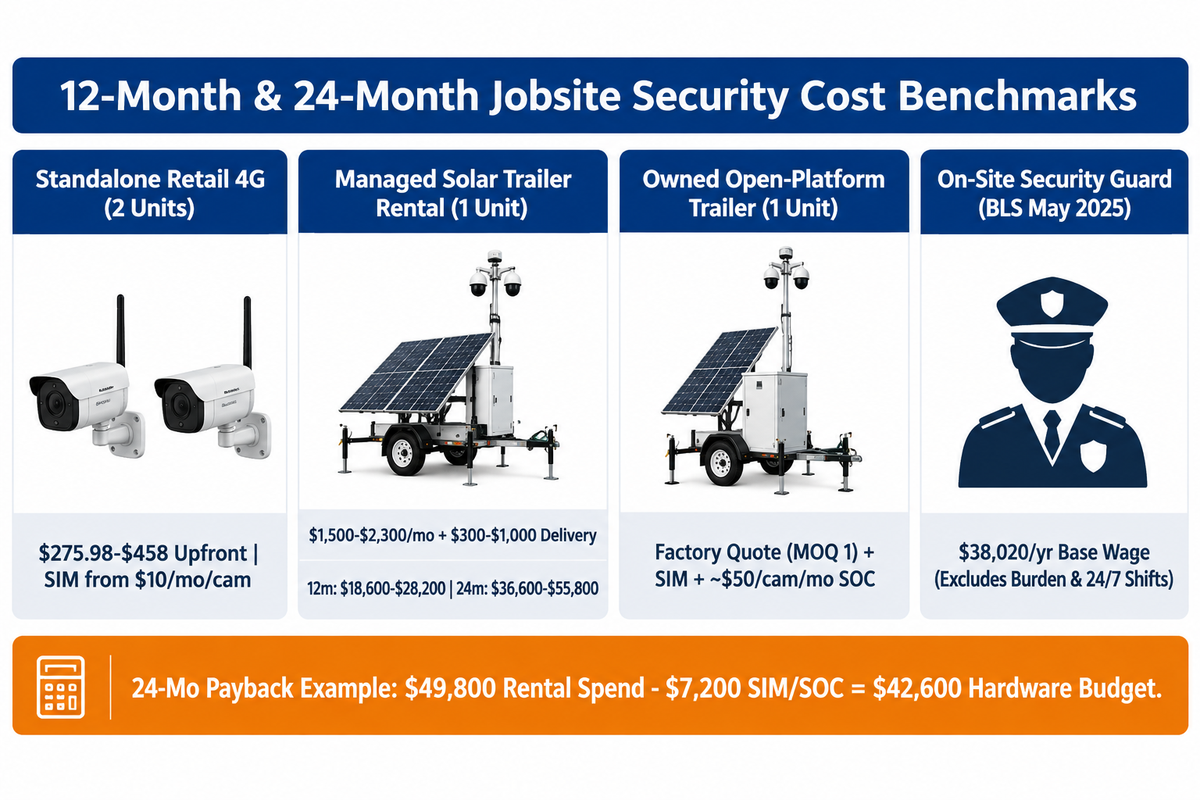
Four U.S. rental listings checked in November 2026 span $750–$3,000/month for solar surveillance trailers (with Duck View Systems quoting $1,500–$2,300/month for a 4-camera monitored rig). Reolink’s U.S. store lists standalone 4G/solar units at $137.99–$229 upfront. The U.S. Bureau of Labor Statistics (BLS) reports May 2025 median base pay of $38,020/year for security guards before payroll burden and multi-shift coverage.
Across those four published U.S. listings, pricing spans $750–$3,000/month depending on hardware and monitoring scope: Duck View Systems lists $1,000–$3,000/month ($1,500–$2,300/month for a 4-camera LTE monitored rig), SiteView Pro lists $1,500–$2,500/month for PTZ trailers with live monitoring, Critical Technical Services lists $1,500–$3,000/month, and SentryPods lists $750–$1,500/month base leases. Eyrus reports delivery and setup fees of $300–$1,000 per trailer plus about $50/month per camera for 24/7 live monitoring. Standalone retail 4G hardware on Reolink’s U.S. store starts at $137.99 before a SIM plan or pole mount.
Evaluating on-site guards requires going beyond base hourly pay. The BLS Occupational Outlook Handbook separates security guards ($38,020/year) from the combined category of security guards and gambling surveillance officers ($38,050/year, or $18.29/hour in May 2025). That base wage doesn’t include employer payroll taxes, workers’ compensation, benefits, agency markup, and multi-shift staffing needed to cover 112+ after-hours and weekend hours per week.
Check five contract fees before signing any short-term rental agreements. Look at mobilization delivery charges, mid-project relocation fees, cellular overage tiers, extended cloud storage fees, and early termination clauses. Contractors running consecutive builds across two years often consider whether owning an open-platform trailer lowers multi-project costs compared with indefinite monthly leases.
12-Month & 24-Month Jobsite Security Cost Comparison (Published U.S. Benchmarks)
| Cost Item | Standalone Retail 4G Camera (2 Units) | Managed Solar Trailer Rental (1 Unit) | Owned Open-Platform Trailer (1 Unit) | On-Site Security Guard (BLS Security Guards Category) |
|---|---|---|---|---|
| Upfront / Purchase Price | $275.98–$458 for 2 units (Reolink U.S. retail $137.99–$229/ea) | $0 purchase; $300–$1,000 delivery (Eyrus) | Factory-direct quote (request spec quote; MOQ 1) | $0 hardware; onboarding/agency setup |
| Recurring Monthly Rate | SIM plan from $10/mo per cam (VOSKER listing via Eyrus; self-monitored) | $1,500–$2,300/mo 4-cam LTE monitored (Duck View Systems) | Carrier SIM plan + optional ~$50/cam/mo SOC (Eyrus) | $38,020/yr median base wage for security guards (BLS May 2025, unburdened) |
| Energy & Connectivity | Small solar panel + 4G SIM | Bundled solar, battery, and LTE data | Solar/LiFePO4 built in; buyer chooses SIM | Guard shack power/HVAC if stationed |
| Maintenance & Spares | Buyer replaces mounts and SD cards | Vendor covers swaps and field service | Buyer handles panel cleaning & scheduled LiFePO4 pack service | Agency handles shift backfill & insurance |
| 12-Mo / 24-Mo Outlay & Risk | Hardware + carrier SIM; no live talk-down deterrence | $18,600–$28,200 (12m) / $36,600–$55,800 (24m) at $1,500–$2,300/mo + $600 delivery | Asset retained across repeat builds; buyer funds SIM, SOC, transport & upkeep | $38,020/yr median base wage per single full-time security guard (excludes burden, markup, & 24/7 shifts) |
Payback example (assumed inputs): Suppose a general contractor runs three consecutive 8-month builds over 24 months and rents one 4-camera monitored trailer at $2,000/month plus $600 delivery per mobilization ($1,800 total delivery). Total 24-month rental spend reaches ($2,000 × 24) + $1,800 = $49,800 with zero residual hardware equity. Subtracting $300/month ($7,200 over 24 months, representing $200/month 4-camera SOC plus $100/month carrier SIM) leaves $42,600 to cover an open-platform trailer purchase plus transport, maintenance, and repairs before redeploying it on projects four and five.
Are Security Cameras or On-Site Security Guards Better for a Construction Site?
Use live-monitored construction security cameras for continuous multi-angle perimeter coverage, and reserve on-site security guards for busy gates requiring badge checks, visitor logs and/or physical emergency responses. The duties of guards and trailer-mounted cameras are different and aren’t direct 1:1 service substitutions.
A single guard watches one zone of a 5-acre lot at a time, whereas four elevated cameras cover multiple unobstructed approaches simultaneously and store time-stamped video records. On high-profile urban builds, contractors often use one daytime gate guard in combination with an off-grid solar trailer for overnight and weekend perimeter surveillance.
Comparing Construction Security Camera Suppliers: Managed Rentals, SaaS Platforms, and Factory-Direct Trailers

Four business models exist for construction camera vendors. For turnkey rentals, vendors include WCCTV, LiveView Technologies, ECAM, and Zedcor. SaaS platforms include TrueLook, OxBlue, and Sensera. Retail cellular brands include Reolink and VOSKER, while factory-direct open trailers include LFADJ. Turnkey rentals are suited to single builds when the owner doesn’t have internal IT support. Retail units are suited to small self-managed yards, and factory-direct trailers are suited to repeat multi-project fleets.
Prospective buyers often compare quotes across incompatible business models as if their hardware and recurring services were identical. A turnkey managed rental bundles together a trailer, a cellular plan, maintenance truck rolls, and optional live security operators, all for a monthly lease. Cloud-based SaaS platforms focus on 4K progress time-lapse, integrations with Procore or Autodesk, and multi-stakeholder portals backed by recurring software fees. Retail cellular brands sell cameras to small builders, who then manage the SIM cards and app notifications on their own.
General contractors, rental fleets, and regional integrators running continuous construction projects often prefer factory-direct open-platform trailers to avoid software lock-in. As a factory-direct benchmark, LFADJ builds the S973 solar trailer with four PTZ cameras and a 3 × 450 Wp (1.35 kWp) solar array. Its 5.12 kWh nominal LiFePO4 battery bank (25.6 V, 200 Ah) powers a 7,000 mm (22.97 ft) telescopic mast. Transport weight is 800 kg (1,764 lb), and operating ambient temperature spans −10 to 50 °C (14 to 122 °F). LFADJ supplies the S973 at a 1-unit MOQ with 50% deposit and balance before shipment. Review full mobile surveillance trailer specifications for custom camera or battery configurations.
| Procurement Model | Representative Suppliers | Hardware Ownership | Monthly Lock-In | Best-Fit Buyer |
|---|---|---|---|---|
| Turnkey Managed Rental | WCCTV, LiveView Technologies (LVT), ECAM, Zedcor, Stealth Monitoring | Vendor owns trailer | High (bundled monthly lease + SOC) | Single projects under 12 months wanting zero maintenance |
| Cloud / Time-Lapse SaaS | TrueLook, OxBlue, Sensera Systems | Lease or purchase + SaaS | Medium-High (portal & cloud fee) | Owners needing Procore time-lapse + basic security |
| Retail Cellular Units | Reolink, VOSKER | Buyer owns camera | Low (SIM plan from $10/mo+) | Residential remodelers & small self-monitored yards |
| Factory-Direct Open Platform | LFADJ (S973 solar trailer) | Buyer owns full trailer | None (open SIM & VMS choice) | Repeat-build GCs, equipment rental fleets, security integrators |
For more regional manufacturers and rental fleets, see our separate article on mobile surveillance trailer companies. Open-platform security cameras for construction sites give you the flexibility to choose local SIM cards, ONVIF surveillance cameras, and independent monitoring centers. This model can be ideal for construction sites run by repeat-build companies because owning the hardware eliminates recurring hardware lease markups.
Privacy Laws, NDAA Compliance, Cybersecurity, and Jobsite Security Camera RFQ Checklist
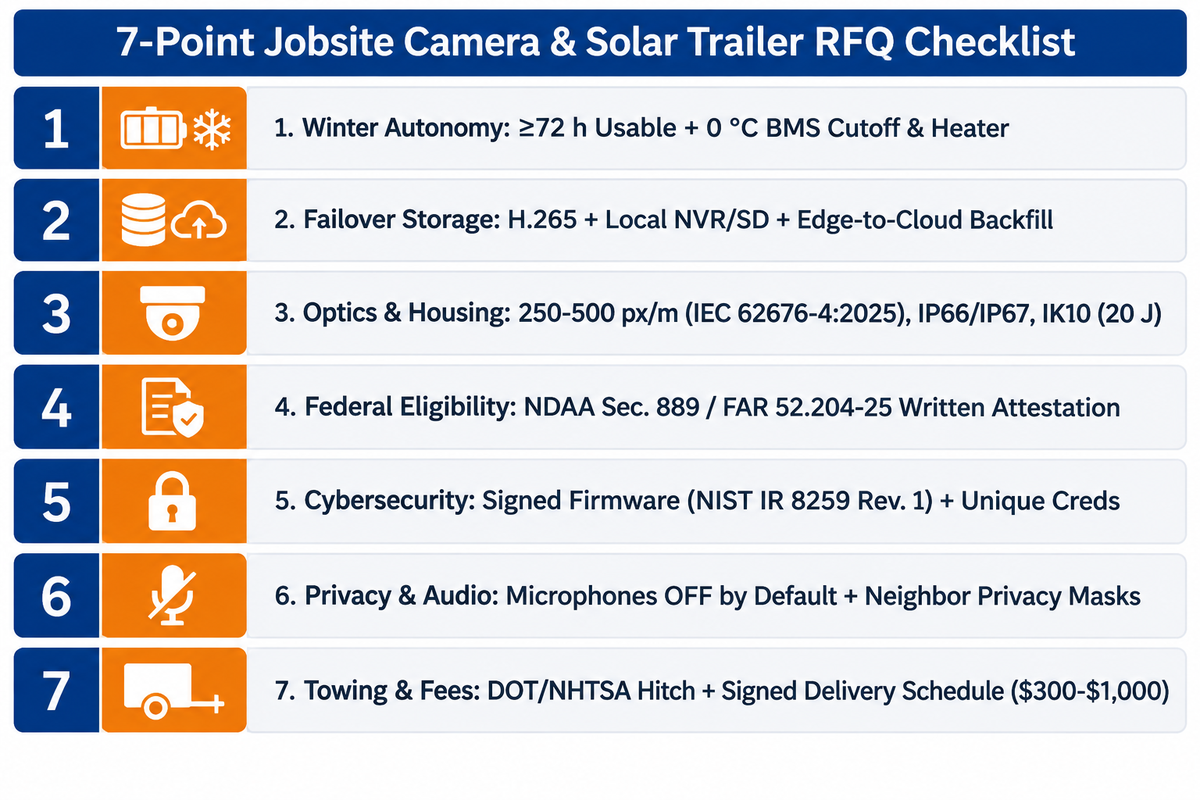
Prior to deploying jobsite cameras, keep audio recording disabled by default, post visible surveillance notices, confirm NDAA Section 889 compliance for federal contracts, and require NIST IR 8259 Revision 1 firmware patching. Attaching a signed acceptance checklist to the RFQ prevents disqualification for non-compliance with regulations and ensures the client receives the trailer.
Federal infrastructure and public-works contractors face binding procurement restrictions under NDAA FY2019 Section 889 (Public Law 115-232) and FAR 52.204-25, as summarized in Congressional Research Service report R48110. Part A took effect August 13, 2019, barring federal agencies from buying covered surveillance equipment. Under FAR 52.204-25(b)(2), Part B restricts federal agencies from contracting with any entity that uses covered video surveillance gear across its operations, subject to statutory exceptions and subcontractor flow-down rules. On EU builds, EU AI Act prohibitions effective February 2, 2025 ban workplace emotion recognition and untargeted CCTV facial-recognition scraping, with maximum penalties scaling up to €35 million or 7% of global annual turnover (per AI Laws by State). Legal commentary from Compound Law advises EU construction firms to inventory site AI systems and check whether safety-critical monitoring triggers high-risk compliance duties.
Networked IP cameras also expand your jobsite’s cyber attack surface when shipped with default passwords or unpatched firmware. In April 2026, the National Institute of Standards and Technology published NIST IR 8259 Revision 1, superseding the May 2020 edition for IoT manufacturer cybersecurity baselines. Buying low-cost cameras that can’t accept signed firmware updates leaves known vulnerabilities open across multi-year projects. As NIST notes in its IoT device security guidance, SP 800-53 flaw remediation control SI-2 can’t be satisfied by devices that lack secure firmware update capability.
Can Employers Legally Record Workers With Construction Site Security Cameras?
Silent video can be used by employers in open work zones, gates, and laydown yards, provided that workers have no reasonable expectation of privacy and state notice rules are met. For instance, New York, Connecticut, and Delaware require written employee monitoring notices. Additionally, a number of regional data-protection laws require written employee monitoring notices. Cameras must be kept out of restrooms and changing rooms. Generally, microphones must be kept disabled. There are exceptions to this, and employers should seek legal counsel before enabling camera microphones.
Legal summaries from Seyfarth Shaw and UpCounsel emphasize that owning the jobsite or camera hardware does not authorize audio wiretapping. State wiretapping laws divide sharply between one-party and all-party consent rules, with strict all-party statutes in states such as California (Penal Code § 632) and Florida (Statutes §§ 934.02–934.03), while several states differ in how they treat in-person conversations versus phone calls. There are privacy concerns if your unannounced camera masts are pointed toward adjacent residential property, including apartments. You should apply a privacy mask to neighboring property and post a clear gate notice.
RFQ checklist — copy these 7 acceptance criteria into your construction security camera quote request:
| Parameter | Recommended Range | Why It Matters | How to Verify |
|---|---|---|---|
| Winter Solar & LiFePO4 Autonomy | ≥72 h usable autonomy at worst-month PSH; BMS 0 °C charge cutoff + heater | Prevents winter blackouts and cold-charge anode lithium plating | Confirm DC watt load sheet, battery Wh × 0.80 DoD, and BMS spec |
| Cellular Failover & Local NVR | H.265 codec; multi-week onboard NVR/SD + edge-to-cloud backfill | Keeps 24/7 evidence intact when 4G LTE towers drop | Unplug SIM during handover test; verify local clip playback & sync |
| Optics & Enclosure Ratings | 250–500 px/m at gates (IEC 62676-4:2025); IP66/IP67; IK10 (20 J) | Supports readable plates and faces with matched shutter and lighting | Check night sample frame at gate distance and enclosure test certs |
| NDAA Section 889 Status | Entity- and equipment-level NDAA Sec. 889 / FAR 52.204-25 compliance | Protects eligibility on federal procurement contracts | Request written NDAA attestation listing cameras, NVR, and modem |
| IoT Cybersecurity Hygiene | Signed firmware updates (NIST IR 8259 Revision 1); unique admin creds | Reduces unauthorized access and supports SP 800-53 SI-2 workflows | Verify firmware update log, TLS encryption, and credential rotation |
| Privacy & Audio Controls | Audio recording OFF by default; neighbor privacy masks enabled | Prevents wiretapping violations and neighbor privacy disputes | Inspect NVR audio toggles, privacy zones, and posted gate signage |
| Road-Towing & Contract Fees | Destination DOT/NHTSA lights/hitch; itemized delivery & relocation fees | Avoids road-tow rejections and surprise mobilization bills ($300–$1,000 per Eyrus) | Confirm trailer axle/coupler spec and sign all-in fee schedule |
Frequently Asked Questions About Construction Security Cameras
Which camera is best for a construction site?
For unpowered open lots, the best camera for construction site monitoring may be a combination of fixed overview bullet cameras and a PTZ camera on a solar-powered surveillance trailer. Choose a cellular pole box on tight urban lots with temporary pole power, a wired PoE system inside finished buildings, or a standalone 4G solar security camera on small residential remodels.
Construction camera vs. security camera: what is the difference?
A construction camera is designed for taking high-resolution daytime time-lapse images for progress and stakeholder updates as well as Procore scheduling logs. The construction site security camera, on the other hand, is designed for low-light, night vision, AI person-and-vehicle detection, local NVR failover, strobe deterrence, and real-time alerts to stop after-hours theft. Incorporating both capabilities within the same trailer is quite common.
Do security cameras lower builder’s risk insurance premiums?
Yes, many builder’s risk underwriters provide premium credits or lower theft deductibles when monitored security cameras are deployed in addition to perimeter fencing and lighting. Credit amounts vary based on the carrier, coverage level, site history, and other factors. If required for your coverage, submit your camera layout, 24/7 monitoring contract, and fence plan prior to binding your coverage.
Can you rent construction site security cameras without a long-term commitment?
Yes, short-term and month-to-month contracts are offered by many U.S. mobile surveillance providers. Short-term contracts typically carry higher monthly rates than annual leases, plus $300 to $1,000 in delivery and pickup fees according to Eyrus benchmarks. Annual contracts are less expensive.
What makes the best solar powered surveillance trailer for construction sites?
A dependable solar trailer matches its solar array and usable LiFePO4 battery capacity to continuous DC load, worst-month peak sun hours, and target overcast autonomy. Under our 2.5 PSH, 75% efficiency, 80% DoD winter benchmark, 50–75 W rigs fit a 1.35 kWp array and 5+ kWh bank. Four-camera 100 W winter rigs need roughly 1.7 kWp and 9 kWh with a 0 °C BMS charge cutoff and heater, plus IP66/IK10 cameras, onboard NVR storage, and open SIM support.
Do you need planning permission to install temporary construction security cameras?
Temporary jobsite cameras inside a private construction fence seldom require separate building permits in the U.S. Placing trailers on public sidewalks, blocking fire lanes, or using municipal utility poles requires local right-of-way approval.
How many security cameras do you need to cover a construction site without blind spots?
Most commercial jobsites under two acres start with 3 to 4 cameras to limit single-angle blind spots. Aim one dedicated gate camera for license plates and facial details. Mount two fixed wide angle cameras to provide an overview of laydown yards and fuel tanks. Add an elevated PTZ camera to provide active zoom coverage for the remaining area. Larger multi-acre parcels obstructed by cranes, concrete cores, or stacked containers usually add additional solar trailers or pole boxes to cover blind spots.
Size Your Off-Grid Jobsite Camera System
Contractors managing recurring off-grid jobsites can avoid permanent lease lock-in with open platform hardware. Review LFADJ’s mobile surveillance trailer specifications for the S973 (4 PTZ cameras, 1.35 kWp solar, 5.12 kWh LiFePO4, 7.0 m mast, 1-unit MOQ). Share your site’s power budget and camera arrangement to get a quotation and secure your jobsite.
References & Sources
- Heavy Equipment Theft Solutions & Annual Loss Estimates National Equipment Register (NER)
- Commercial Heavy Equipment Theft Prevention Guide National Insurance Crime Bureau (NICB)
- Construction Site Theft Prevention Guidelines Canton Police Department (Michigan)
- Cement Your Safety: Construction Site Theft Prevention Tips Fairfax County Police Department
- Improve Safety and Security With Turnkey Construction Cameras Construction Executive (Associated Builders and Contractors)
- US8833985B2: Mobile Solar-Powered Tower With MPPT & Dual Battery Redundancy U.S. Patent and Trademark Office (Google Patents)
- WO2025155336A1: Self-Healing Mobile Surveillance Unit World Intellectual Property Organization (Google Patents)
- IEC 62676-4:2025 Video Surveillance Systems for Use in Security Applications, Part 4: Application Guidelines (Edition 2.0) International Electrotechnical Commission (IEC)
- IEC 62676-5-1:2024 Video Surveillance Systems, Part 5-1: Environmental Image Quality Performance Tests International Electrotechnical Commission (IEC)
- Taking Up Tech: Job Site Security for the 21st Century Construction Dive
- Occupational Outlook Handbook: Security Guards and Gambling Surveillance Officers U.S. Bureau of Labor Statistics (U.S. Department of Labor)
- Section 889 Policies & FAR 52.204-25 Implementation U.S. General Services Administration (Acquisition.gov)
- CRS Report R48110: Federal Procurement Restrictions on Covered Telecommunications and Video Surveillance Equipment Congressional Research Service (U.S. Congress)
- NIST IR 8259 Revision 1: Foundational Cybersecurity Activities for IoT Product Manufacturers (April 2026) National Institute of Standards and Technology (U.S. Department of Commerce)
- Whether You Build Them or Buy Them: IoT Device Security Concerns National Institute of Standards and Technology (NIST)
- AI Act Regulatory Framework & Prohibited Workplace Surveillance Practices European Commission